
September
30/09/2026
App: 6.2.2
Settings: 6.2.2
Resolved issues
🧰 Data Factory
Fixed table-export-items failures caused by transient errors
Data Factory table-export-items now complete reliably even when transient errors occur during execution.
28/09/2026
App: 6.2.2
Settings: 6.2.2
Resolved issues
🎨 Conditional Formatting
Fixed conditional formatting history
Conditional formatting changes made from the interface are now correctly recorded in item history.
Fixed Data Factory job failures caused by transient errors
Data Factory jobs now complete reliably even when transient errors occur during execution.
22/09/2026
App: 6.2.2
Settings: 6.2.2
Resolved issues
🧰 Data Factory
Fixed an archive generation issue
When an archive is generated, images are now correctly included in the archive, and if the image is not reachable an explicit message is raised for understanding why.
21/09/2026
App: 6.2.2
Settings: 6.2.2
Resolved issues
🧰 Data Factory
Fixed unexpected borders in outgoing emails
Emails now render with a clean, border-free layout, restoring consistent branding across all communications.
16/09/2026
App: 6.2.2
Settings: 6.2.2
Improvements
🧰 Data Factory
Improved Data Factory jobs performances
14/09/2026
App: 6.2.2
Settings: 6.2.2
Resolved issues
🌐 API
Fixed broken file links in exports
Download links in exports now point to the file directly, so users can retrieve it without signing in.
💻 User Experience
Fixed previously imported images wrongly flagged as non-compliant
Previously imported images stay accessible and pass validation again, instead of being rejected when their file could not be loaded.
🧰 Data Factory
Fixed public API file URLs rejected by Data Factory
Data Factory tasks can use a file again through its public API URL, so a file uploaded on one account is usable on another.
10/09/2026
App: 6.2.1
Settings: 6.2.1
Resolved issues
🧰 Data Factory
Resize options honored in ZIP exports
Asking for a resized image with ?preset=, ?width= or ?format= in a ZIP export now delivers the resized file, instead of silently packing the full-size original.
Fixed image resize options ignored on document URLs
Images now come back at the size you request across the platform, keeping exports light and complete instead of oversized or partly missing.
03/09/2026
App: 6.2.1
Settings: 6.2.1
Resolved issues
💻 User Experience
Fixed dimension errors when moving or reusing older images
You can now drag down, copy, and drag&drop all images without size errors or losing the original.
02/09/2026
App: 6.2.1
Settings: 6.2.1
Scheduled maintenance - Product-Live Data Factory - 07:30-08:30 CET (Paris time zone)
As part of the continuous improvement of our platform, we are upgrading the technical components behind the management of the files attached to items and to the Data Factory platform. This technical release improves the performance and reliability of our system and enables more efficient file management over time. It introduces no functional change: for users of the application, nothing changes and no action is required.
During this window, the Data Factory platform will be interrupted for about 15 minutes. Job processing will be temporarily paused, and all jobs are expected to resume automatically once the deployment is complete. The Product-Live application remains available during this window: only Data Factory job processing is paused.
For updates and more information, please visit our status page
Fixed image collect failing in some cases from the "Suggestions" interface - 08:00-14:00 CET (Paris time zone)
Following the 02/09/2026 release, images could not be uploaded in some cases from the "Suggestions" interface. The issue was resolved at 14:00 CET (Paris time zone). The affected images can be collected again from this interface.
New Files APIs - the previous versions remain available
New Files APIs are introduced for items, Data Factory, publications and suggestions. They expose the richer file metadata now stored with every file - such as size, MIME type, MD5 and SHA-256 checksums, extension and image dimensions - to both users and developers. The v1 APIs remain available to ensure compatibility with existing integrations.
See the Data Factory Files API (V2) and the Items, Publications and Suggestions APIs.
File download URLs change format
The URLs used to download files hosted on Product-Live (such as Data Factory files) change format with this release. If your integration uses these URLs as-is to download files, no action is required. Download URLs must however be treated as opaque values: if your integration extracts information from them (identifiers, hashes, file names), adapt it before the production release, as the previous format will no longer be returned. The file metadata you may need is exposed by the new Files APIs through the File object.
The file download url returned by the API now responds with a redirect
The download url returned by Get a Data Factory File by Id used to serve the file content directly. It now responds with an HTTP redirect to the file location: make sure your HTTP client follows redirects (most clients do by default). The authentication and the downloaded file content remain exactly the same - only the extra redirect step is new. If this change impacts your integration, please contact our support team at support@product-live.com.
Improvements
🧰 Data Factory
Data Factory data-item-find readable payload error message
Job execution logs now show a clear message when a payload limit is exceeded, so you can diagnose and act without contacting support.
✏️ Table Editing
Feature in phase
The Field Edition is in phase. You can contact the Product-Live team at contact@product-live.com if you want more details and get an early access.
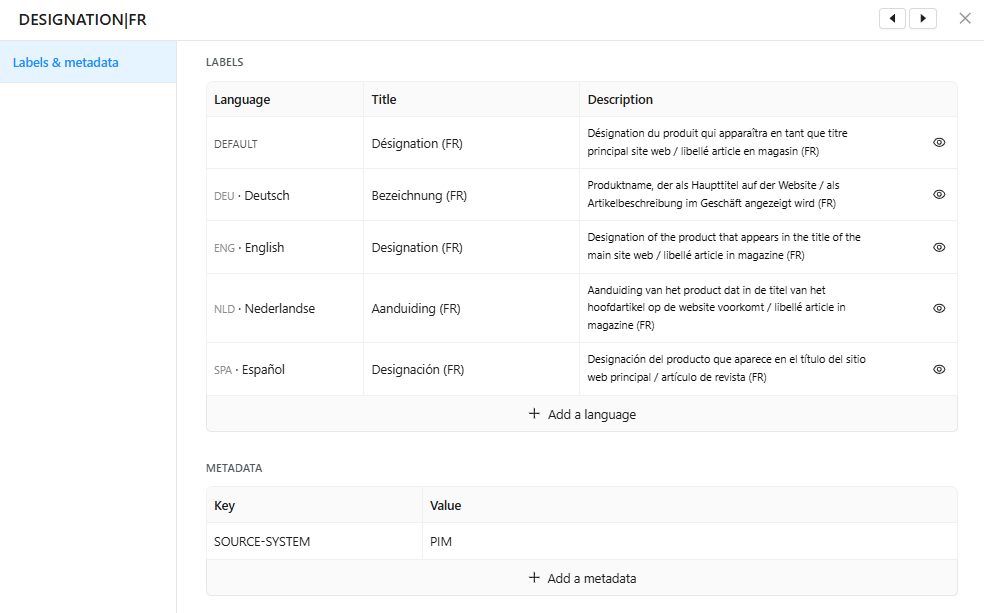
Improve field clarity
All field titles, descriptions, translations and metadata can now be edited directly from the column header, so users and suppliers always have clear and up-to-date instructions when filling in their product data.
💻 User Experience
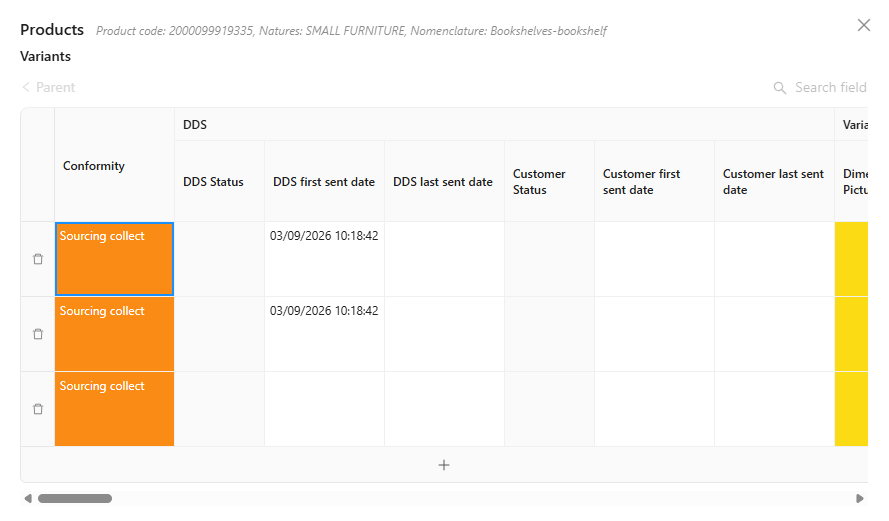
Improve composite lines conformity visibility
In composite fields, each line conformity is now more easily seen helping you see where you need to focus, speeding product overall validity.
Resolved issues
📥 Publication/Collect
Fixed composite suggestions created with fields outside their target screen
Suggestions are now built only from the publication fields that belong to their target screen, so hidden fields with existing values are no longer flagged as empty.
💻 User Experience
Fixed image loss when moving images and broken image paste
When moving a image between fields fails, the image is correctly restored on the source field, and copy-pasting an image now applies it to the target field.
Detail view button reachable on all rows
Fixes the detail view button disappearing on table rows whose number reaches four digits, so the right-side detail panel stays reachable on every row.
Fixed page crash when filtering classifications while editing a cell
Users can now click the classification attributes link while a cell is being edited without crashing the page.
Fixed hidden image file formats when uploading from your computer
When editing an image field, you can now select any supported image format from your computer.
Fixed silent image rollback when uploading unsupported formats
The App grid now tells users why an image is rejected instead of silently reverting the cell when uploading an unsupported format.
Sub-fields of a composite field opened from the detail view are now correctly filtered based on the active screen configuration, so users only see the data relevant to their view.
Fixed sections in composite fields opened from detail view
Composite fields with sections now display correctly when opened from the detail view of a screen where the field is not present.
01/09/2026
the id attribute of exported items becomes
The id attribute of each item exported by the table-export-items Data Factory task becomes generally available and is exported for every account (see How releases are done?).
If your integration validates export files against a strict schema, make sure the new attribute is accepted and adapt your integrations before the production release.