
April
29/04/2026
App: 5.83.0
Settings: 5.83.0
Improvements
⏩ Quick Import
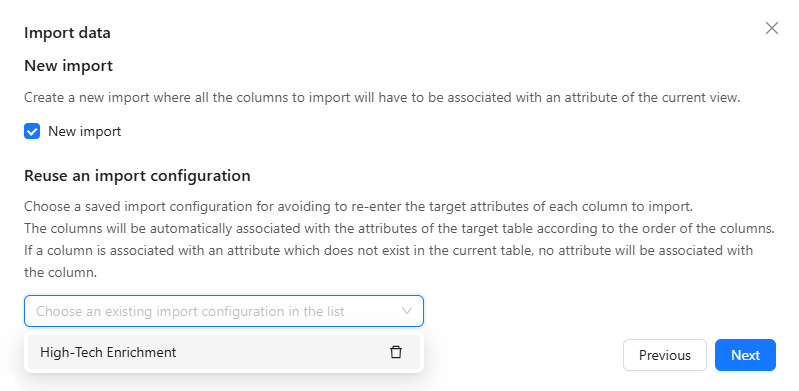
Delete outdated Quick Import configurations
You can now delete Quick Import configurations directly from the configuration selector, keeping your list clean and easy to navigate.
🌐 API
New Users API
The /v1/users and /v1/users/{id} endpoints now return firstActivityAt and lastActivityAt, making it easy to identify active and inactive users directly from the API.
json
{
    "object": "user",
    "id": "10193",
    "createdAt": "2024-01-15T10:00:00.000Z",
    "updatedAt": "2025-03-20T08:30:00.000Z",
    "firstName": "John",
    "lastName": "Doe",
    "email": "John.Doe@retailx.com",
    "status": "ACTIVE",
    "role": "ADMIN",
    "firstActivityAt": "2024-01-16T09:12:33.000Z",
    "lastActivityAt": "2025-04-07T16:45:12.000Z"
}🧰 Data Factory
New Data Factory exchange-create-suggestions
You can now automate the collect of your partner products including composite fields. Moreover with this new Data Factory exchange-create-suggestions task, you can now create more advanced suggestions dedicated to different screens with different set of data which can either be automated or require manual controls.
json
{
    "name": "exchange-create-suggestions",
    "taskReferenceName": "Collect suggestions",
    "description": "Collect suggestions from received publications",
    "type": "SUB_WORKFLOW",
    "optional": false,
    "inputParameters": {
        "publications": "${workflow.input.publications}",
        "screens": "${workflow.input.screens}"
    }
}📥 Publication/Collect
Improve Suggestions visibility
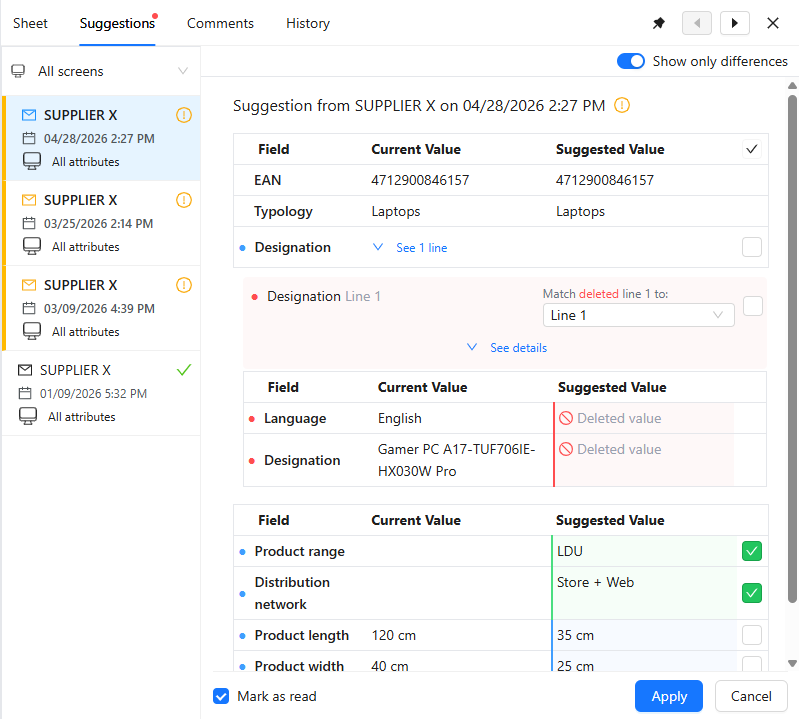
When inspecting the suggested values of your partner, you can now see only the fields suggested to you and not also the fields of your current screen, enabling you to more easily see values requiring your attention.
You can now also filter the suggestions you receive from your partner based on screen enabling you to see only relevant suggestions according to your responsibilities: referencement, enrchiment, logistics, medias, tariffs...
💻 User Experience
Search categories by key in classification filters
You can now filter classifications by category key, in addition to title, making it easier to find the right category without ambiguity.
Resolved issues
📥 Publication/Collect
Fix a composite field suggestion issue
When a composite field or all its lines are deleted then published, you can now correctly see this deletion suggested in your suggestion enabling you to keep your product up to date.
💻 User Experience
Fix an issue when viewing timeout task logs
You can now correctly view the log details of Data Factory protocol-http-perform task that ended in timeout, instead of seeing a front-end error.
21/04/2026
App: 5.82.0
Settings: 5.82.0
Improvements
🌐 API
New Data Factory Logs apis
You can now generate Data Factory Logs directly within your jobs using the new API. This feature allows you to add valuable and debug information for your administrators, enabling them to investigate and assess the performance of your jobs more effectively.
Improve Images API
The Images API now exposes the total page count of a document, giving you a reliable way to determine exactly how many images to generate before starting the conversion.
💻 User Experience
Improve field search
You can now search fields which are within composite fields as you do for any other field enabling you to easily go see and update the required information on your products.
🧰 Data Factory
New Data Factory task data-variable-increment
New Data Factory task data-variable-increment allows atomic increment and decrement operations on Data Factory variables, even in concurrent scenarios. It simplifies handling counters by avoiding manual GET/PUT logic and conflict management. This feature ensures reliable, thread-safe updates with straightforward configuration.
json
{
    "name": "data-variable-increment",
    "taskReferenceName": "increment_variable",
    "description": "Increment variable by 1",
    "type": "SUB_WORKFLOW",
    "optional": false,
    "inputParameters": {
        "request": {
            "method": "INLINE",
            "contentType": "application/json",
            "model": "default",
            "json": {
                "operations": [
                    {
                        "key": "itemuniqueid",
                        "type": "increment",
                        "context": {
                            "variableId": "1899743"
                        },
                        "valueField": "value",
                        "incrementBy": 1
                    }
                ]
            }
        }
    }
}17/03/2026
SFTP server deletion
The legacy SFTP server client-storage.product-live.com and ftp.product-live.com has been decommissioned. All SFTP connections must be migrated to the new designated server.
16/03/2026
Scheduled maintenance - Product-Live Data Factory - 12:00-12:15 CET (Paris time zone)
As part of routine infrastructure maintenance, job processing will be temporarily suspended during this window. All jobs will resume automatically upon completion.
During this window, job processing will be temporarily paused. All jobs are expected to resume automatically once maintenance is complete.
For real-time updates, please refer to our status page
13/04/2026
App: 5.81.1
Settings: 5.81.1
Resolved issues
🧰 Data Factory
Fix an issue on the Data Factory file-generation-archive task
Fixed an issue where the XML header generated by the Data Factory file-generation-archive task contained an invalid attribute order, producing malformed XML files. Affected exports are now generated with a valid XML declaration, restoring full file compatibility.
Fix issue import items "Unclosed root tag"
Fix the "Unclosed root tag" error where item import jobs fail due to a malformed XML report despite all items being successfully imported, resulting in unjustified technical errors for users.
09/04/2026
App: 5.81.1
Settings: 5.81.1
Improvements
🌐 API
New api endpoints
New api partners endpoints are now available enabling you to manage and access your partners information within your Data Factory jobs.
🧰 Data Factory
New Data Factory exchange-create-publications
You can now automate the publication of your partner products including composite fields. Moreover with this new Data Factory exchange-create-publications task, you can now create more advanced suggestions, with the Suggestions api, dedicated to different screens with different set of data which can either be automated or require manual controls.
json
{
    "name": "exchange-create-publications",
    "taskReferenceName": "create_publications",
    "description": "Create publications",
    "type": "SUB_WORKFLOW",
    "optional": false,
    "inputParameters": {
        "items": "file://assets/items.xml",
        "screenKey": "SUPPLIERS",
        "partnerAccountKey": "${workflow.variable.partnerKey}"
    }
}📥 Publication/Collect
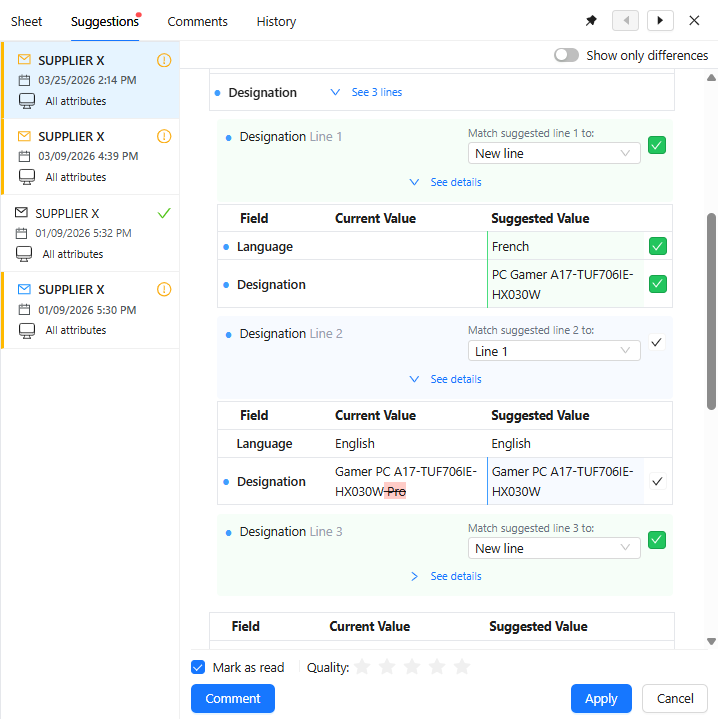
Apply suggested composite fields on your products
It is now possible to apply suggested composite fields through the interface enabling you to updates your products with the suggested values from your partners including composite fields.
Improve Suggestions api
You can now, from your suggestions, retrieve the matching item line for each suggestion composite field line, enabling you to automate the application of those lines on your products. That enables you to reduces the amount of controls your teams need to do to update your products based on your partner suggestions.
Resolved issues
🌐 API
Fix a Publications api issue
When retrieving publications using the Publications api, you can not correctly get the composite fields published enabling you to automate advance collect workflows.
📥 Publication/Collect
Fix a Composite line recommandation issue
When a collect strategy is defined on an option list field within composite field, the suggested lines are now recommanded on the correct item lines enabling you to easily know on which line to apply updates.
💻 User Experience
Fix a composite field edition issue
When editing text fields within a composite field, Suppr now behaves as expected, deleting the character before and not the whole field value.