
July
28/07/2026
App: 5.91.0
Settings: 5.91.0
Planned interruption of Product-Live Data Factory between 13:30 and 14:00 CET (Paris time zone)
As part of routine maintenance, we will be performing updates on our infrastructure.
During this window, job processing will be temporarily paused. All jobs are expected to resume automatically once maintenance is complete.
For updates and more information, please visit our status page
Improvements
💻 User Experience
Copy & paste progress on the main grid
Copy & paste on the main grid now shows a progress indicator so you always know when the operation is running.
Resolved issues
🧰 Data Factory
Fixed outdated user inputs persisting after job update
Updating a job now removes user inputs deleted from its definition, so launches only prompt for current inputs.
Fixed data conditional formatting not refreshing after table update
Data conditional formatting now stays up to date after each table update.
💻 User Experience
Fix Copy & paste infinite loading modal
Copying an empty datetime field and pasting it into an empty date field no longer triggers an infinite loading modal.
20/07/2026
App: 5.90.0
Settings: 5.90.0
Improvements
🎨 Conditional Formatting
Improved clarity of compliance details for composite fields
The compliance details of composite fields now directly shows which fields to fix, removing the ambiguous numeric badge.
Compliance details now follow the same field order as the screen
Fields in the compliance details are now displayed in the same order as on the composite screen, so you can fill them in sequence without losing your place.
💻 User Experience
Edit composite fields like a spreadsheet
You can now drag and drop images between cells in a composite field, just like in the main grid.
Composite fields validation visibility
Composite field cell now highlight when a sub-field rule is violated, so you can spot invalid data at a glance without opening the compliance panel.
Faster screen loading with composite fields
Screens with composite fields now load quicker, so you can access your data without waiting.
👤 User Management
Improved partner invitation email subject
The invitation email sent to new partners now says "Welcome to Product-Live" instead of "Welcome", helping recipients identify the sender and open it.
Resolved issues
🧰 Data Factory
Fixed suggestion application task processing limit
The exchange-apply-suggestions Data Factory task now processes all suggestions regardless of volume, eliminating silent data loss on large batches.
🌉 Mapping
Fixed multi-page selection for rule execution jobs
Users can again apply mapping rules to all filtered products across every page, restoring bulk data automation.
📥 Publication/Collect
Item update date on data reception
The item update date is now correctly refreshed when suggestions are applied, enabling reliable date-based filtering.
Fix composite field suggestion display
Composite sub-fields absent from the publication screen are no longer shown as deleted when reviewing a suggestion from a different screen.
08/07/2026
App: 5.89.0
Settings: 5.89.0
Improvements
📥 Publication/Collect
Cleaner composite fields suggestions
Suggestions now show only composite fields with actual changes, making it easier to focus on what really needs your attention.
💻 User Experience
Edit composite fields like a spreadsheet
You can now drag down a cell value to fill multiple rows at once in a composite field; no more retyping the same value line by line.
Cross-partition item search remembers last-used identifier
Last-used identifier is now remembered in cross-partition item searches, so you don't have to reselect it every time.
Feature in alpha phase
The Find items across all partitions is in phase. You can contact the Product-Live team at contact@product-live.com if you want more details and get an early access.
Edit composite fields like a spreadsheet
Resolved issues
🧰 Data Factory
Data Factory table-delete-items task respects partition filters on export
Data Factory table-delete-items now exports only items from the targeted partitions, so deletions run faster.
⏩ Quick Import
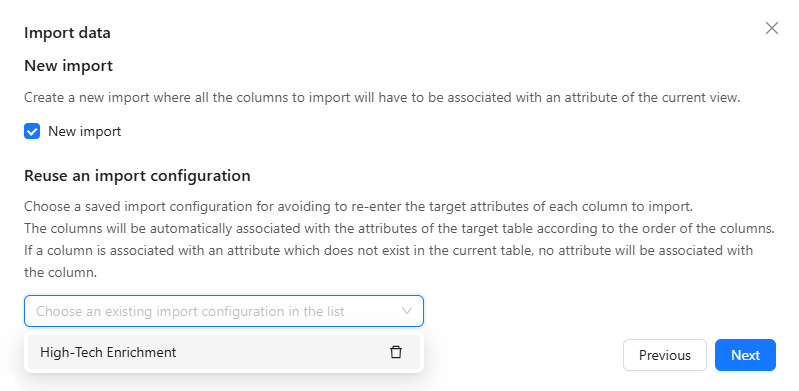
Quick Import configuration deletion is now available for all accounts
Import configurations can now be deleted regardless of account settings, so you can keep your configuration list clean.
💻 User Experience
Composite fields with screen sections now display correctly
Composite fields configured with screen sections no longer open empty, so you can view and edit your data without having to refresh the page.
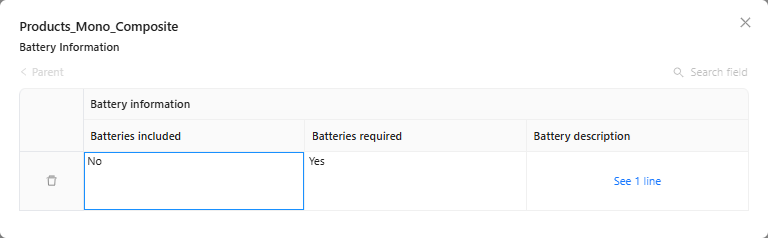
Fixed incorrect cell selection in composite fields with sections
Shift+click in composite fields now selects exactly the targeted cells, enabling reliable bulk operations across sections.
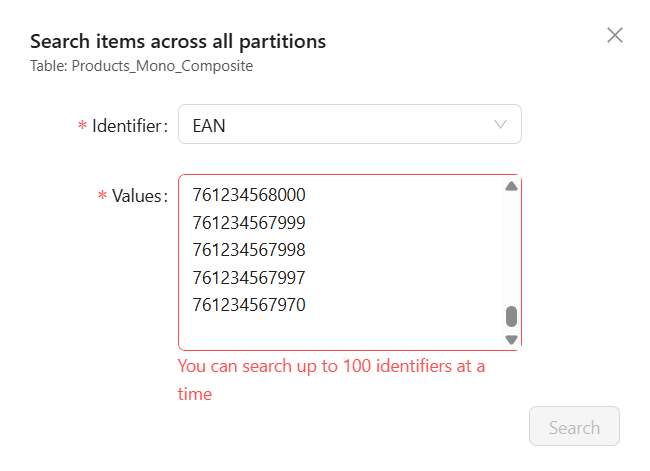
Cross-partition item search now returns results reliably up to 100 identifiers
Searching many items across partitions now returns results reliably up to 100 identifiers, if exceeded, a clear error message tells you how many are accepted.
Feature in alpha phase
The Find items across all partitions is in phase. You can contact the Product-Live team at contact@product-live.com if you want more details and get an early access.