
AI orchestration with Data Factory
Improve texts, prepare translations and match images. Product-Live brings these automations into your existing jobs, with your choice of language model and your team's review before changes are applied.
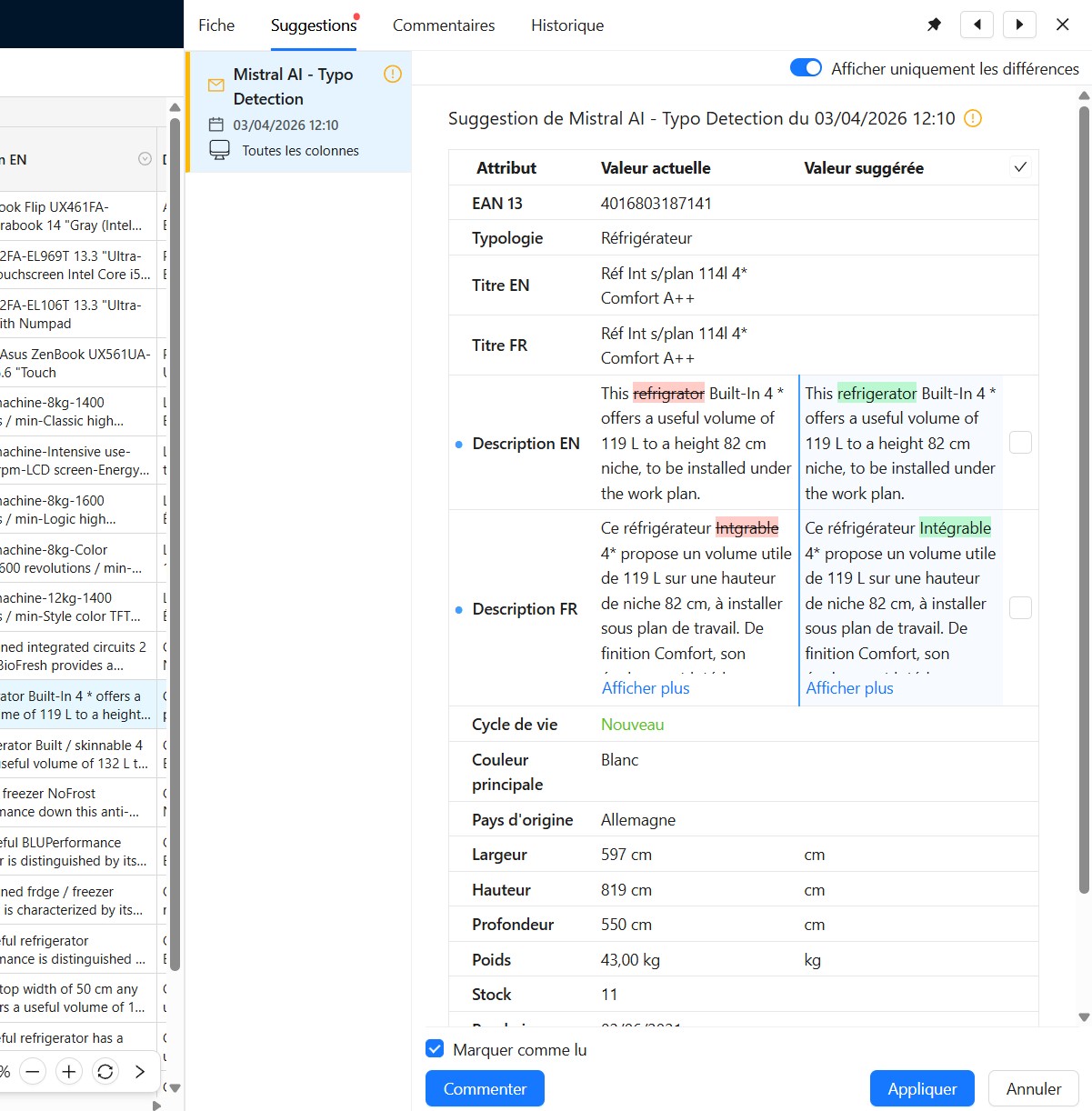
AI suggests. Your team decides. Proposals appear alongside the suggestions you already receive from partners. Your team compares them with existing values and chooses what to keep.
Start with a ready-to-use AI job, adapt it to your business requirements, then extend it across your catalogue. You choose what to automate, which data to use and where human review belongs.
Explore the available use cases - Get started
Built around your needs
Adapt each automation to your use case
Your catalogue has its own fields, languages and business rules. Shape AI instructions around them: preserve brand names, follow your terminology or translate specific fields into the languages you need.
Example instruction
"Correct spelling mistakes and typos in French. Keep brand names unchanged (Acme). Do not rephrase, only fix errors."
Combine AI with data collection, transformations and validation steps in the same job. Start from an existing automation and add or replace individual steps as your needs evolve.
Keep your choice of language model
Choose the provider and model that suit each use case, with OpenAI, Mistral and Anthropic supported today. Use your own provider account and change models as your requirements evolve.
Your jobs are independent of a single provider. Switching models keeps the surrounding job in place; you can adapt the instructions and validate the results for the new model.
Connect with the systems you already use
Bring AI into the flows that connect your suppliers, business systems and Product-Live. Work with files, cloud storage and existing integrations to prepare product data before requesting AI suggestions.
For example, a job can collect a supplier file, prepare its product texts and request translations for your team to review in Product-Live. These steps run within the same platform that manages your existing automations.
Keep your team in control of product data
The ready-to-use AI jobs create suggestions, using Product-Live's existing review process. They leave current product values untouched. Your team can compare proposed values, apply the ones it wants and leave the others aside.
Automatic acceptance is a separate choice you configure. You can keep human review on sensitive fields and choose to automate acceptance on selected attributes as your process matures.
See what runs and what changes
Each suggestion identifies its source, so your team knows which automation proposed it. Administrators can inspect the data sent to the model, its response and the outcome of each step. They can also stop a running automation or disable its schedule.
Product teams control which proposed values they apply; administrators control how the automation runs. These actions follow your account's existing permissions.
Extend automation across your catalogue
Apply the same instructions across a whole product table and schedule recurring runs as your data evolves. Batch processing lets you organize larger catalogues into manageable runs.
Plan the pace around your provider's limits, processing costs and your team's review capacity.
Start with a concrete use case
These ready-to-use AI jobs turn repetitive data work into proposals your team can review.
| Your goal | What AI helps you do | Get started |
|---|---|---|
| Improve the quality of product texts | Identify spelling mistakes and typos, and suggest corrected wording in the fields you choose. | Detect typos |
| Prepare your catalogue for more markets | Translate product fields into your target languages and submit the translations for review. | Translate product fields |
| Associate images with products | Suggest which images belong to which products based on filenames and product data. This uses naming conventions, not image analysis. | Match images |
| Update your data from PDF documents | Use the documents' contents to propose updates to your existing data for your team to review. | Update data from PDF documents |
| Fill the holes in a catalogue from public sources | Search the web for the fields you flag and propose values, each with the page it was read on. | Fill fields from the web |
Each job provides a starting point you can adapt to your fields and instructions. All ready-to-use AI jobs are supplied with Mistral configured; their setup guides explain how to switch provider. Every job is packaged with mistral-small-latest.
From your data to a decision
mermaid
flowchart LR
    data["<b>Your product data</b><br/>the scope you configure"]
    data:::diagramBlueElement
    ai["<b>AI proposals</b><br/>your instructions and model"]
    ai:::diagramLightGrayElement
    suggestions["<b>Product-Live suggestions</b><br/>alongside existing values"]
    suggestions:::diagramBlueElement
    team["<b>Your team decides</b><br/>which values to apply"]
    team:::diagramBlueElement
    data --> ai --> suggestions --> team
For example: your administrator chooses the source fields, target languages and translation instructions; the job proposes translations in Product-Live; your team reviews them in the usual suggestions pane and applies the values it approves. The AI handles the repetitive preparation - your team keeps the product knowledge and the final decision.
Get started
These automations run in Data Factory, Product-Live's platform for connecting systems and automating processes. In the documentation, an automation is called a job. Choose the path that matches your role.
Account administrators: use an available AI job
Start from a ready-to-use AI job, configure it for your catalogue and decide when it runs. Each guide covers prerequisites, the data it uses, setup and the suggestions it creates.
- Browse the ready-to-use AI jobs.
- Understand data sharing, permissions and control.
- Schedule recurring runs and monitor or stop an execution.
Developers: build and integrate your own jobs
Compose AI calls with existing Data Factory tasks. Define the inputs, instructions and handling of the response, then create suggestions for your users to review. Provider-specific behavior and configuration examples are covered in the task reference.
- Design jobs with your AI coding assistant, in early access: Claude Code, OpenAI Codex, Gemini CLI or Mistral Vibe write, validate and package the job from your description.
- Build your first Data Factory job.
- Call a model with AI.
- Process calls in batches and create product suggestions.
- Connect your systems and integrate through the Data Factory API.
Product teams: review suggestions in Product-Live
Today, AI jobs are set up by your administrator or development team. You review their proposals through the existing suggestions interface. Learn how to review AI suggestions.