
8. Periodicity
Requirements
- You have done all the previous tutorials
What you will learn
- How to set your Jobs periodic
Jobs can be set periodic.
Periodicity is defined when you edit your Job in Settings.
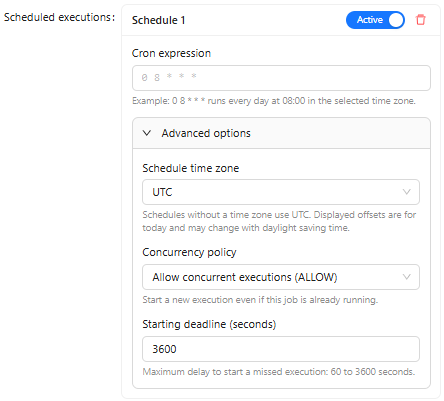
You can add one or multiple periodicities.
The format is a cron schedule expression. For example if you want to set up the periodicity every day at 1 am you will use 0 1 * * *, if you want every day at 2:35 am 35 2 * * *. If you don't know this format you can learn it by examples here: https://crontab.guru/examples.html
You can specify the timezone used to schedule your job clarifying when it will be executed (taking into consideration summer and winter hours).
In addition you can specify how it should behave when a new scheduled execution has to start when an exiting one is not finished:
- Allow : allow concurrent executions, meaning that multiple executions will run at the same time
- Forbid: skip new executions, meaning that while an execution is in progress, no other execution can start
- Replace: replace running executions, meaning that when an execution is in progress, a new execution starts while canceling the current one
The starting deadline specify how long a new execution can wait the end of the previous job execution before starting, allowing you some flexibility in your scheduling and handling time to time longer executions whitout stopping your periodic processes.
Info
If you set a periodicity on the previous Job you will get an error during the execution. This is due to the fact that the task export is set to the mode: "USER_SELECTION" therefore the Job expect a user selection to be executed.
Periodicity must be set for Jobs like daily getting files within a sFTP server or daily export all items to an API with the mode: "ALL" on the Export Items task.
What you have learned
- Jobs can be periodic
- Periodicity is defined by cron schedule expressions
Next
You will learn about how to set variables and secrets.