
Detect typos in product texts and propose corrections
In a nutshell
This job reads the items you selected in the grid, sends the text fields you flag to a language model to detect typos and misspellings, and creates suggestions with the corrected values.
Only fields marked with a metadata key (default: ai-typo-check set to true) are read and analyzed, giving you fine-grained control over which fields are checked.
📥 Download the latest version of this job.
⌛ Time to setup: 10 minutes.
📋 Prerequisites: A Product-Live account with Data Factory access, an API key for your language model provider (the packaged job is configured for Mistral), and a launch from the table and the screen holding the items you selected in the grid.
The current version is (last updated on 2026-11-13).
Generic job reference: .
Name of the job once imported: AI Typo Detection.
Result
Once set up, the job is available in the Data Factory jobs list.
Launch the job from the table and the screen holding the items you want to check, with those items selected in the grid. The selection is what the job reads: with no item selected, the run stops before any request and asks for a selection.
When executing the job on a selection of items:
- The values of the flagged fields of each selected item are sent to the language model for analysis, one request per item, up to 100 items per run (the
maxItemssetting) - If any typo is detected, one suggestion is created on the item, holding one corrected value per flagged field. The suggestions appear in the standard Product-Live suggestions panel with a configurable emitter name (default: AI - Typo detection), where you can review and accept or reject them.
- At the end of the run, a short report in the execution's Actions panel gives the number of items read and of suggestions created, and the estimated cost of the AI requests.
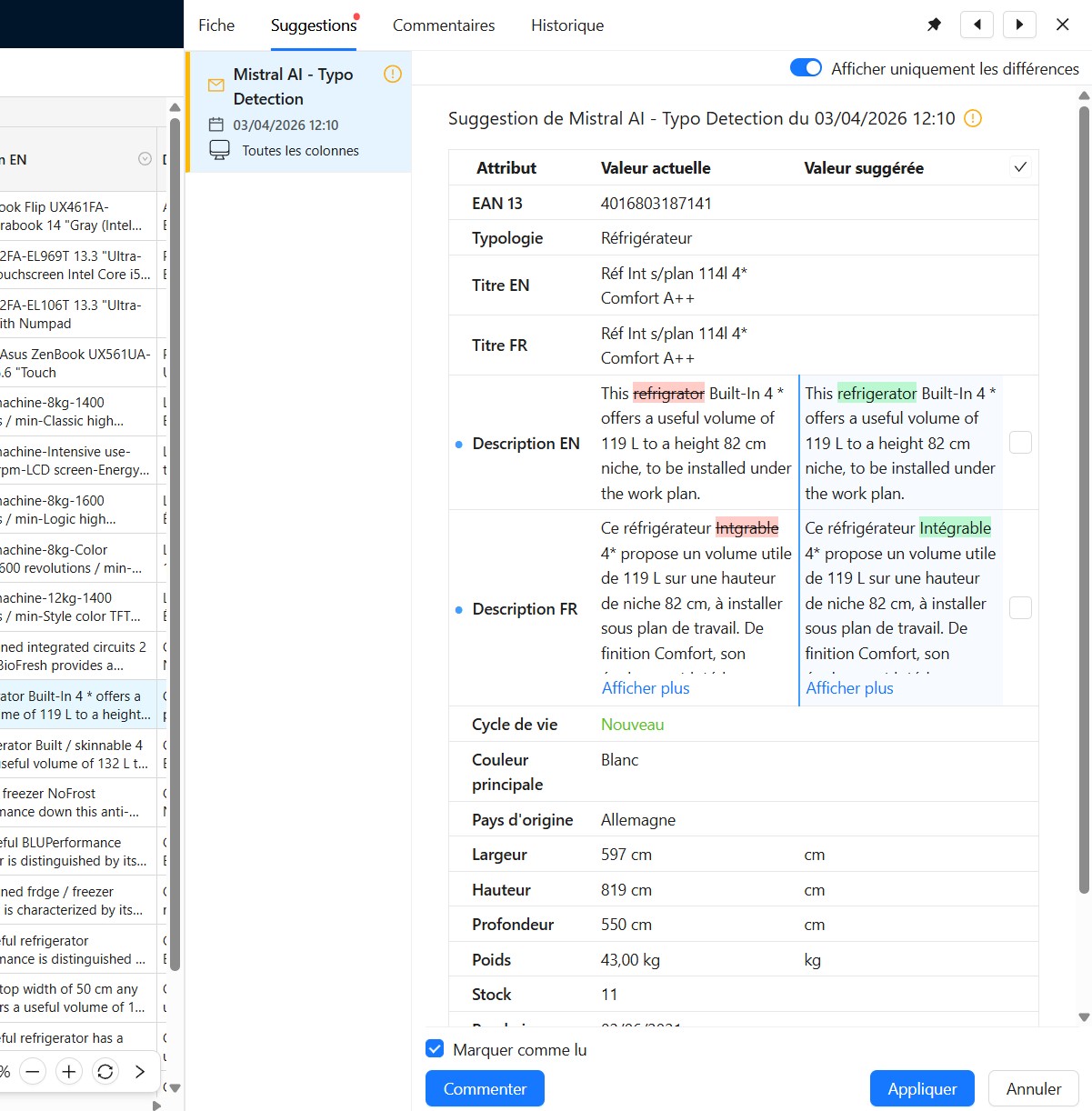
What you keep control of
- Which items are read: only the items selected in the grid when you launch the job are analyzed, up to
maxItems; see Result. - Which fields are read: only fields you flag with the metadata key are read from the catalogue and sent to the model; see Field metadata configuration.
- What the model is asked: the prompt is a text file in the job assets, edited without code; see Prompt template.
- The name shown to your users: the emitter name displayed on each suggestion is a setting of the job; see Configuration (config).
- The provider and the model: both are settings of the job, and the API key is a variable in your account; see Switching provider.
- The last word: the job writes suggestions, never product values; a person accepts or rejects them; see Suggestions created by AI jobs.
Requirement
To deploy this job, you'll need:
- A valid Product-Live account with Data Factory access
- An API key for your language model provider. The packaged job is configured for Mistral (get a key at console.mistral.ai); see Switching provider for OpenAI or Anthropic.
- At least one field with the metadata
ai-typo-checkset totrue, on the level of the screen you launch the job from - A launch from a table and a screen, with the items to check selected in the grid: the job takes its table, its screen and its items from there
If you don't have access to the Data Factory module, please contact our support team.
Setup
- Download the last version of this job, available here
- Import the downloaded Data Factory job in your account
- Create a Data Factory variable named
mistral_api_keywith your Mistral API key as the value - Set the metadata
ai-typo-checktotrueon the fields you want to check for typos
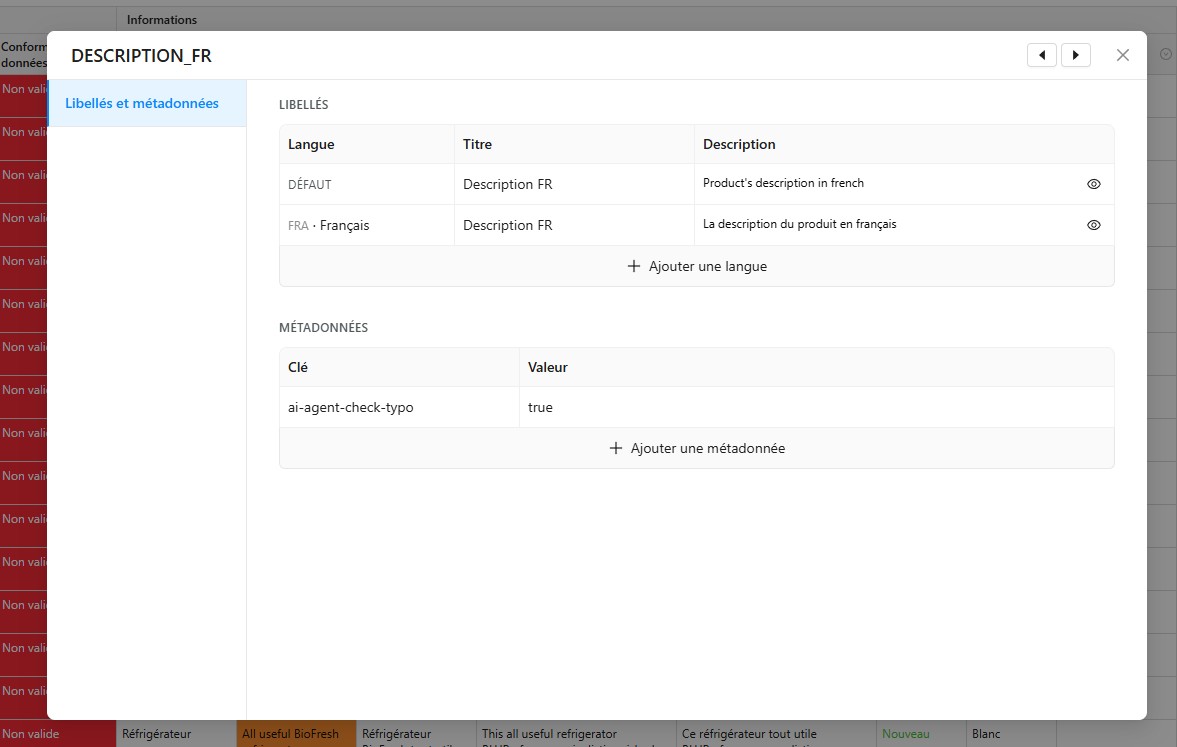
Then open the table and the screen you want to work on, select the items to check in the grid, and launch the job from there. Run it on a handful of items and review the suggestions before widening the selection.
Further information
How it works
The job takes its table and its screen from the launch context, and its items from your grid selection. It reads the level of the launch screen, asks the API for the text fields of that level flagged with the metadata, then reads the selected items with the values of those fields only. For each selected item, it inserts the flagged values into the prompt stored in assets/prompt-template.md. The prompt asks the model to:
- report only spelling mistakes, typos and obvious text errors, and not to suggest style improvements, rephrasing or enhancements;
- use a comma as the decimal separator, not a period;
- keep units in lowercase (for example
kg, notKG); - leave brand names and technical terms capitalized where they normally are (for example
iPhone,PlayStation); - answer with a JSON object listing, for each corrected field, its key and the whole corrected value, or an empty list when no typo is found.
The job then turns each non-empty answer into one suggestion on the item, with one proposed value per corrected field. A correction on a field that was not sent for that item, or identical to the current value, is ignored. Selected items carrying no flagged value are skipped before any request is sent.
Switching provider
The job is packaged for Mistral: the provider and model settings of the config task select the provider and the model, and the key is read from the Data Factory variable mistral_api_key, referenced in job.json as the apiKey input of the build_prompts task. To use OpenAI or Anthropic:
- In
config, setprovidertoopenaioranthropic. - In
config, setmodelto a model of that provider, see Available models. - Store that provider's key in the
mistral_api_keyvariable, or create a new variable and change the${workflow.globalVariables.mistral_api_key}reference injob.json. - Optionally change
suggestionNameso reviewers see the right source.
This job requests responseFormat: json_object, which Anthropic ignores; the prompt template already asks for JSON, so check that the answer parses on a test run. Re-import the job and run it on a small selection first.
Field metadata configuration
To mark a field for typo checking, add the following metadata to the field definition:
json
{
    "ai-typo-check": "true"
}The job filters the fields through the API, so a field flagged with another value, or on another level than the launch screen, is never read.
The metadata key is written in the criteria of the find_fields task, and in the message of the check_fields task shown when no field is flagged: change it in both places to use another key.
Prompt template
The prompt sent to the language model is stored in assets/prompt-template.md. It uses a {{FIELDS}}
You can edit this file to customize the instructions given to the model (e.g. add locale-specific rules) without modifying any JavaScript code. Keep the answer format: the job reads corrections, fieldKey and correctedValue.
Configuration (config)
All configurable values are grouped in the first task config of job.json. Edit its inputParameters to customize this job:
| Setting | Key | Default | Description |
|---|---|---|---|
| Provider | provider | mistral | The language model provider, see Switching provider |
| Model | model | mistral-small-latest | The AI model used for the API call |
| Maximum items | maxItems | 100 | The number of selected items read in one run; the rest of the selection is not processed |
| Suggestion name | suggestionName | AI - Typo detection | The emitter name shown on created suggestions |
| Pricing | pricing | {"currency": "USD", "inputPerMillionTokens": 0.15, "outputPerMillionTokens": 0.6} | The prices behind the estimated cost of the report: the price per million input tokens and per million output tokens of model, in currency. The defaults follow Mistral's public prices for mistral-small-latest in November 2026: update them when you change provider or model, see Cost and limits |
There are no table or screen settings: the job reads context.view.table, context.view.partition and context.view.screen from where it is launched, and the items from the grid selection.
Variables
| Variable | Description |
|---|---|
mistral_api_key | Your API key for the language model provider (passed to the provider by the AI / Call a model task) |
Outputs
| Output | Description |
|---|---|
itemsRead | Selected items read, at most maxItems |
itemsChecked | Items sent to the model |
maxItemsReached | true when maxItems items were read: the selection may hold more, so select fewer items or raise the setting |
suggestionsCreated | Suggestions created, one per item with at least one correction |
fieldsSuggested | Corrected values, summed over the items |
aiErrors | Answers that failed or could not be read; the other items are unaffected |
message | The report shown in the Actions panel |
Cost and limits
- One request is sent per selected item holding a flagged value, at most
maxItemsper run. Each request carries only the flagged values of that item. - When you pick the items one by one, keep the selection to 150 items or fewer: the platform can refuse a longer list of item identifiers in one request. A select all in the grid is not affected and is read up to
maxItems. - The cost shown in the report is an estimate: the tokens the provider reported, priced with the
pricingsetting.
Job design
The job is composed of 13 tasks. The fields are filtered by their metadata through the API, the items are read with the flagged fields only, and all AI prompts run in parallel through task-batch-execute, organized as presented in the following diagram:
mermaid
flowchart TD
	_start(("Start"))
	_end(("End"))
	config["<b><a href='/data-factory/references/tasks/set-variable/'>set-variable</a></b><br />Job settings - edit the values below"]
	check_selection{{"<b><a href='/data-factory/references/tasks/switch/'>switch</a></b><br />Stop when no item is selected in the grid"}}
	terminate_no_selection(["<b><a href='/data-factory/references/tasks/terminate/'>terminate</a></b> (COMPLETED)<br />No item is selected"])
	find_screen["<b><a href='/data-factory/references/tasks/data-screen-find/'>data-screen-find</a></b><br />Read the launch screen to get the level of the selected items"]
	find_fields["<b><a href='/data-factory/references/tasks/data-field-find/'>data-field-find</a></b><br />Find the text fields of that level flagged with the metadata ai-typo-check"]
	check_fields{{"<b><a href='/data-factory/references/tasks/switch/'>switch</a></b><br />Stop when no text field is flagged"}}
	terminate_no_fields(["<b><a href='/data-factory/references/tasks/terminate/'>terminate</a></b> (COMPLETED)<br />No text field is flagged"])
	find_items["<b><a href='/data-factory/references/tasks/data-item-find/'>data-item-find</a></b><br />Read the selected items, with the flagged fields only"]
	build_prompts["<b><a href='/data-factory/references/tasks/code-execute-javascript/'>code-execute-javascript</a></b><br />Build one prompt per item with the values of its flagged fields"]
	check_prompts{{"<b><a href='/data-factory/references/tasks/switch/'>switch</a></b><br />Stop when no selected item has a value to check"}}
	terminate_nothing_to_check(["<b><a href='/data-factory/references/tasks/terminate/'>terminate</a></b> (COMPLETED)<br />No selected item has a value to check"])
	run_prompts["<b><a href='/data-factory/references/tasks/task-batch-execute/'>task-batch-execute</a></b><br />Send the prompts to the AI provider, five at a time"]
	build_suggestions["<b><a href='/data-factory/references/tasks/code-execute-javascript/'>code-execute-javascript</a></b><br />Turn the corrections into one suggestion per item"]
	check_suggestions{{"<b><a href='/data-factory/references/tasks/switch/'>switch</a></b><br />Create the suggestions when the AI found typos"}}
	create_suggestions["<b><a href='/data-factory/references/tasks/data-suggestion-create/'>data-suggestion-create</a></b><br />Create the suggestions, failing if one is refused"]
	build_report["<b><a href='/data-factory/references/tasks/code-execute-javascript/'>code-execute-javascript</a></b><br />Write the short report shown at the end of the run"]
	display_report["<b><a href='/data-factory/references/tasks/notification-display-message/'>notification-display-message</a></b><br />Show the report in the Actions panel"]
	_start --> config
	config --> check_selection
	check_selection -->|"NO_SELECTION"| terminate_no_selection
	check_selection -->|"default"| find_screen
	find_screen --> find_fields
	find_fields --> check_fields
	check_fields -->|"NO_FIELDS"| terminate_no_fields
	check_fields -->|"default"| find_items
	find_items --> build_prompts
	build_prompts --> check_prompts
	check_prompts -->|"NOTHING_TO_CHECK"| terminate_nothing_to_check
	check_prompts -->|"default"| run_prompts
	run_prompts --> build_suggestions
	build_suggestions --> check_suggestions
	check_suggestions -->|"CREATE"| create_suggestions
	create_suggestions --> build_report
	check_suggestions -->|"default"| build_report
	build_report --> display_report
	display_report --> _end
Tasks
| # | Task | Reference | Description |
|---|---|---|---|
| 1 | set-variable | config | Hold the job settings |
| 2 | switch + terminate | check_selection | Terminate in success if no item is selected in the grid |
| 3 | data-screen-find | find_screen | Read the launch screen to get the level of the selected items |
| 4 | data-field-find | find_fields | Find the text fields of that level whose metadata ai-typo-check is true |
| 5 | switch + terminate | check_fields | Terminate in success if no text field is flagged |
| 6 | data-item-find | find_items | Read the selected items with the flagged fields only (includedFieldKeys), at most maxItems |
| 7 | code-execute-javascript | build_prompts | Build one ai-prompt-execute entry per item holding a flagged value, from assets/prompt-template.md |
| 8 | switch + terminate | check_prompts | Terminate in success if no selected item holds a flagged value |
| 9 | task-batch-execute | run_prompts | Run one prompt per item in parallel via ai-prompt-execute (concurrency: 5) |
| 10 | code-execute-javascript | build_suggestions | Parse the answers, build one suggestion per item and add up the tokens used |
| 11 | switch + data-suggestion-create | check_suggestions / create_suggestions | Create the suggestions, one per item, only if the model found typos |
| 12 | code-execute-javascript | build_report | Write the short report, with the estimated cost of the AI requests |
| 13 | notification-display-message | display_report | Show the report in the Actions panel |
Assets
| File | Description |
|---|---|
build-prompts.js | Builds one ai-prompt-execute entry per selected item from its flagged values, and keeps what was sent to check the answers |
prompt-template.md | The prompt template sent to the language model, with |
build-suggestions.js | Parses the answers and builds one suggestion per item, ignoring corrections of fields that were not sent or that change nothing, and adds up the tokens the provider reported |
build-report.js | Writes the short report shown in the Actions panel, with the estimated cost of the AI requests |