
Rules engine
What is the rules engine?
The rules engine lets you automatically fill and update fields based on rules, instead of entering data manually.
Product data usually exists in many places (ERP, PIM, supplier catalogs, retailer requirements), and teams end up copy/pasting the same information across tables and partners. This creates:
- duplicated work
- inconsistencies between catalogs and partners
- slow updates when a source value changes
- manual fixes and avoidable errors
The rules engine solves this by letting you define repeatable rules once, and Product-Live applies them consistently keeping your data aligned over time.
How it works
The rules engine provides two tools that share the same building blocks (conditions, actions, templates) but serve different purposes.
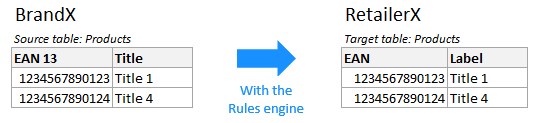
Map fields copies and transforms data from a source table into a target table. Use it when you need to transfer or adapt data between partners or catalogs, for example: from a supplier table to a retailer table.
Automate fields computes and updates fields within the same table. Use it when you need to derive or maintain values from other fields in the same table, for example: computed prices, derived attributes, or consistency helpers.
In practice, suppliers and vendors use mappings to keep multiple catalogs in sync, and automation to keep computed fields consistent inside their own tables.
Map fields
Field mapping lets you copy and transform data from one or more source tables into a target table. It is typically used to transfer data between partners - for example, from a supplier catalog to a retailer catalog.
Methodology
Please consult the following document for best practices Mapping Methodology (French version).
How mappings run
Mapping rules are executed asynchronously, on demand or on a schedule (usually nightly). You can also apply rules to a selected list of items if an action is configured.
Each source item is matched to a target item via a pivot identifier: a field whose value is shared between the two tables. See Link tables for details on how to configure this.
Rules are evaluated in order. The first rule that matches executes, and all subsequent rules for that target field are skipped for that run. If another field depends on the updated field, it will use the newly computed value.
Setup
- Link tables - connect the target table to one or more source tables and choose a pivot identifier.
- Create mapping rules - configure the action and conditions for a target field.
Use cases
See Mapping use cases for examples and best practices.
Automate fields
Field automation lets you compute and update fields within the same table, based on other fields in the same item. It is typically used for derived values - for example, pricing (calculated from base price, discounts, and taxes), dimensions, default values based on item categories, or specific option subsets tailored to product categories (e.g., DEA, DEEE).
How automation runs
Automation rules are executed instantly when a value is modified. Formulas are evaluated in priority order, the last matching rule wins and overrides previous values. If a rule updates a field, subsequent rules are evaluated against the updated value.
When a field is edited, only formulas on other fields that reference that specific field are executed. If a field has multiple formulas, some using the edited field and others not, only the formulas referencing the edited field run, this can result in incomplete updates if formulas are not configured consistently.
WARNING
We strongly recommend applying the same conditions to all formulas associated with a single field, or using a single template to ensure consistency.
Setup
Field automation is part of the table structure and requires administration rights. Configure Formula rules in the table structure and deploy them using the table-import-schema task.
Use cases
See Automation use cases for examples and best practices.