
December
23/12/2025
App: 5.70.0
Settings: 5.70.0
Product-Live maintenance
In order to mitigate the recent Data Factory issue, technical maintenance has been done.
It affects your items conditional formatting which is temporarily out of sync. We will shortly performs necessary actions to refresh them.
We recommand you to wait for your daily Data Factory updates to get your items conditional formatting updated.
If you need assistance, please contact our support team at portail@product-live.com.
16/12/2025
App: 5.70.0
Settings: 5.70.0
Improvements
💻 User Experience
Improve markdown preview format
Markdown-formatted fields are now enhanced for better readability, making value verification easier.
Enable read only composite fields
Now, within composite fields, you can customize their display in the interface. This includes the ability to pin fields and restrict editing, enabling you to tailor data presentation to meet your team's specific requirements.
🧰 Data Factory
Enable empty record import on composite fields
You can now [import(/data-factory/references/tasks/table-import-items/index.md#fields-with-type-composite) any number of records, whether empty or populated, into composite fields. This feature allows you to create and update products with the precise data you need, ensuring greater flexibility and accuracy in your product management.
Resolved issues
👤 User Management
Fix an issue preventing to invite user with similar emails
As account administrators you can now invite any user without email collision, allowing you to better manage your users - even when typos occur.
09/12/2025
App: 5.69.0
Settings: 5.69.0
Improvements
💻 User Experience
Improve Composite field edition
As for items edition on the grid and the detail view, it is now possible to edit composite field with keyboard shortcuts. That enables you to check and update advanced product data faster.
All existing shortcuts apply to composite fields, and additional ones enables to navigate more easily:
- Dig in a composite field: Enter or Space
- Dig out a composite field: Escap
Note that Escap key enables you to go to the parent composite field, until the top one. Then it enables you to go back to the product on the Grid and Detail View.
Resolved issues
💻 User Experience
Fix an issue not displaying localized title within composite field
Field titles and description are now correctly displayed in your user interface language helping you navigate, check and edit your products.
🗨️ Comments
Fix an issue preventing comment thread closing
You can now close comment threads regardless of whether your partner has deleted the product. This feature allows you to focus on genuine pending discussions by closing all other threads, giving you a clearer overview of active conversations.
🧰 Data Factory
Fix an issue preventing to update options color
Product option values can now be updated more effectively to accurately reflect the designed color in the interface, enabling users to quickly understand what each option value represents.
04/12/2025
Planned interruption of Data Factory and Imgproxy between 12:00 and 14:00 CET (Paris time zone)
As part of ongoing maintenance, we are updating our internal tools to a newer version. This includes: Conductor and Imgproxy.
This maintenance will result in a complete unavailability of both services during the maintenance period.
For more information, please visit our status page
Fix an issue when downloading large file
Large documents can now be downloaded seamlessly from Product-Live, allowing you to explore your product exports more efficiently.
November
27/11/2025
App: 5.68.0
Settings: 5.68.0
Visual Studio Code Extension: 1.17.0
Resolved issues
🌐 API
Product-Live api update
Delete the public DNS entry api-next. The endpoint api-next.product-live.com has been replaced by api.product-live.com.
🧰 Data Factory
Fix an issue preventing to automate multiple values lists
It is now possible to automate multi-values lists based on other product values with the Rules Engine, enabling you to speed up completion time and reduce error risks.
💻 Visual Studio Code Extension
- Some performance improvements and minor bug fixes.
TIP
This extension can be downloaded from the Visual Studio Code Marketplace, do not hesitate to reach out to us if you have any feedback or questions.
13/11/2025
App: 5.67.1
Settings: 5.67.1
Resolved issues
💻 User Experience
Fix a date and time filter issue
When you apply a date and/or time range filter, the previously set condition will be visible again when you reopen the filter.
Fix a filter issue
When a filter is applied to a column, it remains active even after the column is hidden from screen configuration.
🔢 Formula
Fix a Rules Engine condition issue
It is now possible to condition Rules Engine rules based on MULTIPLE-SELECT... fields containing multiple options at the same time, ex: MEN AND WOMEN.
05/11/2025
App: 5.67.0
Settings: 5.67.0
Improvements
💻 User Experience
Improved specific fields in Detail view
Now, when a specific field is displayed as read-only on the Detail view, its status is clearly visible, enhancing overall readability.
🧰 Data Factory
Composite read-only fields
Within a Composite field, you can now easily identify which fields are editable, similar to the grid. This enhancement helps you avoid wasting time attempting to edit non-editable fields, streamlining your workflow.
The Composite field is in phase. You can contact the Product-Live team at contact@product-live.com if you want more details and get an early access.
Resolved issues
💻 User Experience
Fix navigation between items' comments by allowing one-click switching.
You can now easily switch between items' comment threads by clicking on the respective icon, enhancing intuitive and efficient navigation.
XML 1.1 support in Data Factory table-export-items task
You can now export items in XML 1.1 format using the Data Factory's table-export-items task. Transitioning to XML 1.1 is especially beneficial when your items include characters that are not supported by the XML 1.0 specification.
🗃️ Traceability
Improve Item history information
The Item history now displays historical values in your user interface language, making it easy to track changes.
The item history is in phase. You can contact the Product-Live team at contact@product-live.com if you want more details and get an early access.
🗨️ Comments
Fix an issue preventing to navigate between comment pages
When you have plenty of comment threads, you can now effortlessly browse through all of them, making it easier to revisit and resolve longstanding pending discussions with your partner.
October
29/10/2025
App: 5.66.3
Settings: 5.66.3
Resolved issues
💻 User Experience
Fix date and time filter
Filters for date and time fields are now restored to their normal functionality, allowing you to easily search for your products based on date ranges, such as shipping date or creation date.
22/10/2025
App: 5.66.2
Settings: 5.66.2
Resolved issues
💻 User Experience
Fixed text filter
Text filters have now been restored to their full functionality, enabling you to effortlessly search for products using text that includes spaces.
21/10/2025
App: 5.66.0
Settings: 5.66.0
Improvements
💻 User Experience
Improve composite editor fields
Within a composite field, the field editors are now fully visible, simplifying the editing process.
The Composite field is in phase. You can contact the Product-Live team at contact@product-live.com if you want more details and get an early access.
Enable custom screen section order display on detail view
You can now also apply custom screen sections order on detail view, allowing you to more easily organize data in your custom screen for the detail view.
🔢 Formula
Increase source fields in Rules Engine templates
You can now use up to 20 source fields in your Rules Engine templates enabling you to automate more complex and valuable fields on your products.
Resolved issues
🧰 Data Factory
Fix an issue causing invalid job execution status
14/10/2025
App: 5.65.0
Settings: 5.65.0
Improvements
⛰ Multi-niveau
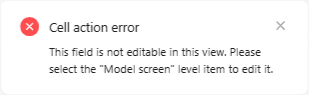
Better inform users when editing parent/child items
On multi-levels tables, you can see why and how to edit parent and child product fields, so you won’t waste time guessing.
🧰 Data Factory
Filter items based on composite fields values
You can now automate your product exports and workflows whether the composite field is empty or not, enabling you to streamline your processes based on structured data.
xml
<Filter-Field-Composite key="BATTERIES_REQUIRED" operator="EMPTY"/>
<Filter-Field-Composite key="$.BATTERIES_REQUIRED.BATTERIES_CONTAINED" operator="NOT_EMPTY"/>The Composite field is in phase. You can contact the Product-Live team at contact@product-live.com if you want more details and get an early access.
🔢 Rules Engine
Enables Rules Engine to access to composite fields value
You can now reference any composite field value in your field automations, enabling more advanced rules and richer automation.
twig
{{targetItem.fields.BATTERIES_REQUIRED.BATTERY_TYPE_CODE.value.data}}Remove field compatibility checks in Rules Engine
When you use templates in field automation, you can leverage any product field to define when and how the current field is set. This gives you greater control and more advanced capabilities. Please ensure the automation outputs a valid value for the target field.
💻 User Experience
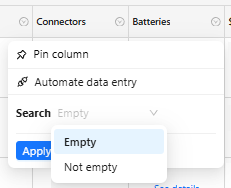
Enable to filter items based on composite fields
You can now filter your products based on the composite field value, just like you can with other fields. This allows you to quickly identify products requiring updates before going forward.
The Composite field is in phase. You can contact the Product-Live team at contact@product-live.com if you want more details and get an early access.
Improve line breaks in fields
To simplify multi-lines texts editions, shuch as designations, descriptions and so on, you can now use the additional keyboard shortcuts Shift + Enter and Alt + Enter like in Excel and other tools.
Improve markdown visibility
On every screen, you can turn on markdown display on LONG-TEXT, improving readability and accelerating controls. At the same time we improved markdown formatting visibility on the interface making it even easier to consult them.
xml
<Column-Field key="DESCRIPTION_EN" position="6" display="MARKDOWN"/>| Before | Now |
|---|---|
 |  |
Resolved issues
💻 User Experience
Fix an issue preventing to edit items in detail view when changing screen on the grid
When a product is opened in the detail view, it remains editable after you switch the grid screen, enabling you to view two data sets simultaneously and continue enriching your product data.
Resolve issue preventing file updates from being saved
Whether you upload a file or copy its URL, you can now save it to the field with the keyboard shortcut Ctrl+Enter, speeding up your workflow and task completion.
Fix an issue hiding image preview while editing field
When you upload a file to a field, it no longer disappears during validation with Enter keyboard. You can now see exactly which file you uploaded before saving.
Fix an issue preventing to edit linked items in detail view
When you open a linked product from the detail view, you can edit it there; no need to switch to the product table, saving you time.
02/10/2025
App: 5.64.0
Settings: 5.64.0
Improvements
💻 User Experience
Improve markdown fields visibility with new display
You can now preview Markdown fields and view their values directly formatted in both the grid and detail views, making validation easier by showing exactly what your customers will see.

The markdown preview is in phase. You can contact the Product-Live team at contact@product-live.com if you want more details and get an early access.
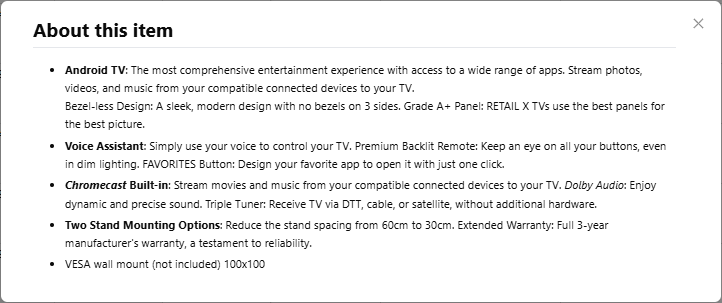
Improve LONG-TEXT markdown preview
Markdown preview now displays formatted text more accurately, improving readability and showing content closer to how customers will see it.
The markdown preview is in phase. You can contact the Product-Live team at contact@product-live.com if you want more details and get an early access.
Prevent detail view refresh when changing grid screen
To improve product data visibility, you can now display and switch screens in either grid or detail view without losing your previously selected screen in either view.
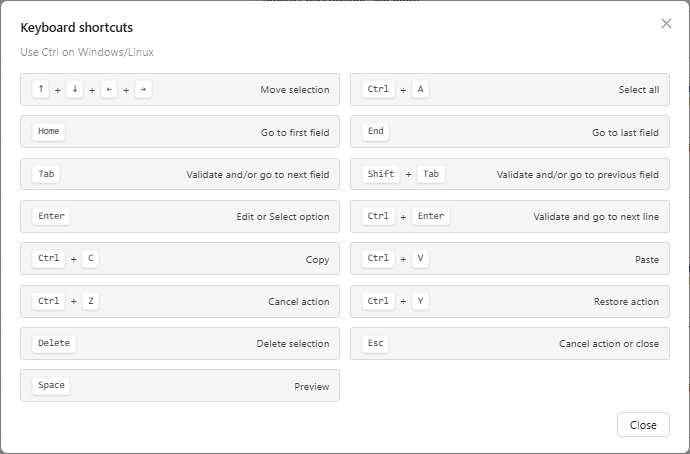
Improve keyboard usability
With previous improved keyboard shortcuts, you can now find them directly in your application next to the Learning center. In addition you can open them with a dedicated keyboard shortcut Ctrl+/.

Resolved issues
💻 User Experience
Improve invalid identifier edition error
When an invalid IDENTIFIER value is applied, the error message now clearly explains why it cannot be saved, and the previous IDENTIFIER value is correctly displayed again in the interface.
September
25/09/2025
App: 5.63.0
Settings: 5.63.0
Improvements
💻 User Experience
Improve keyboard navigation on detail view
It is now easier than ever to use Product-Live exclusively with your keyboard, enabling you to accelerate your tasks through familiar and intuitive keyboard shortcuts.
The shortcuts are:
- Move selection : ⇧ , ⇩ , ⇦ , ⇨
- Select all : Ctrl + A (or Cmd + A according to your operating system)
- Go to first field or value start : Home
- Go to last field or value end: End
- Validate and/or go to next field : Tab
- Validate and/or go to previeous field : Shift + Tab
- Edit or select an option/category : Enter
- Validate and got to next line : Ctrl + Enter (or Cmd + Enter)
- Copy : Ctrl + C (or Cmd + C)
- Paste : Ctrl + V (or Cmd + V)
- Cancel action : Ctrl + Z (or Cmd + Z)
- Restor action : Ctrl + Y (or Cmd + Y)
- Delete selection : Del
- Cancel an action or close : Esc
- Preview : Space
Resolved issues
💻 User Experience
Fix a Conditional Formatting refresh issue
When editing a field, the conditional formatting status updates correctly and refreshes in both the grid and detail view, ensuring that the product's current status is always accurately displayed.
Fix an issue on automated field refresh
When editing a field, automated fields updates correctly and refreshes in both the grid and detail view, ensuring that the product's data is always accurately displayed.
🗃️ Traceability
Fix an issue related to images in item history
Changed image names are now correctly displayed in the item history.
The item history is in phase. You can contact the Product-Live team at contact@product-live.com if you want more details and get an early access.
🧰 Data Factory
Fix an issue in the Data Factory loop task
The input parameters for the Data Factory loop task are now properly handled, empowering you to create more sophisticated and flexible workflows.
23/09/2025
App: 5.62.0
Settings: 5.62.0
Resolved issues
🧰 Data Factory
Fix an issue preventing to import items with composite field values
All composite embedded field values are now correctly imported.
The Composite field is in phase. You can contact the Product-Live team at contact@product-live.com if you want more details and get an early access.
18/09/2025
App: 5.62.0
Settings: 5.62.0
Improvements
💻 User Experience
Product detail view customization
You can now apply custom screens to both the grid and detail views, allowing you to display two sets of product information side by side. This enhancement improves product enrichment and provides greater control over the displayed data.
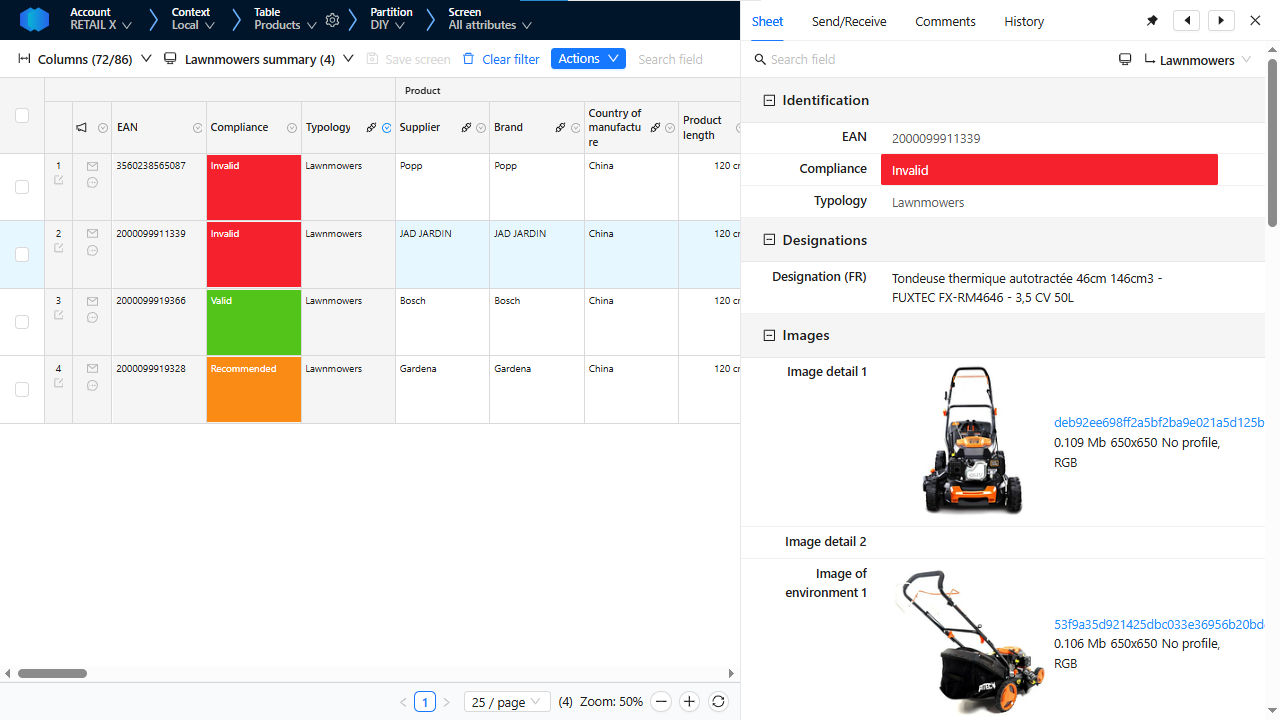
The Product detail view customization is in phase. You can contact the Product-Live team at contact@product-live.com if you want more details and get an early access.
Resolved issues
⛰ Multi-niveau
Fix a filtering issue when changing screen on multi-levels tables
Filtering capabilities have been enhanced across multi-levels tables. Users can now apply filters at a specific level and seamlessly switch views to display either parent or child items that match the filter criteria. For example, you can filter your catalog by multiple article's EAN and then switch the view to see the related models, providing a more flexible and efficient browsing experience.
💻 User Experience
Fix a display issue in the markdown viewer
Markdown tables and color formatting are now fully supported in the markdown viewer, allowing you to easily preview field content exactly as your customers will see it.
The markdown preview is in phase. You can contact the Product-Live team at contact@product-live.com if you want more details and get an early access.
04/09/2025
App: 5.61.0
Settings: 5.61.0
Improvements
💻 User Experience
Improve text visibility with new display
You can now easily preview how your text will appear in your catalog on Product-Live. This allows you to review and refine your messaging early in the process, ensuring a better experience for your customers and enhancing the overall quality of your product presentation.
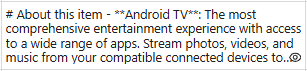
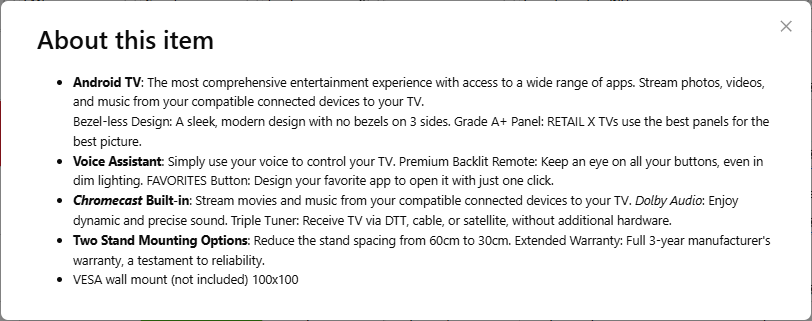
The markdown preview is in phase. You can contact the Product-Live team at contact@product-live.com if you want more details and get an early access.
Quickly now a composite field value
You can now effortlessly identify whether your composite field is empty through visual cues, simplifying your controls and enhancing overall efficiency.
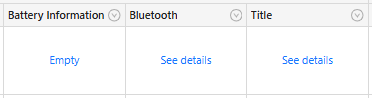
The Composite field is in phase. You can contact the Product-Live team at contact@product-live.com if you want more details and get an early access.
🧰 Data Factory
Enable table's partition archiving
In Data Factory, the table-import-schema task now supports archiving partitions. This enhancement allows you to hide obsolete partitions from your partners and users, helping to streamline data management and improve data clarity.
Resolved issues
🗃️ Traceability
Fix an item history navigation issue
The navigation through your item history is now fully operational, allowing you to efficiently investigate changes with ease.
The item history is in phase. You can contact the Product-Live team at contact@product-live.com if you want more details and get an early access.
🧰 Data Factory
Fix variable usability in Data Factory Loop task
Within the Data Factory Loop task, both the 'context' and 'eventCorrelationId' values are explicitly propagated to the nested tasks inside the loop. This ensures that these elements are accurately transmitted and remain accessible at every level of execution.
Fix an issue that limited the number of items that could be deleted at a time.
The maximum number of criteria applicable to the Data Factory table-delete-items task is now accurately enforced. This enhancement prevents undesirable behavior and helps ensure optimal performance.
03/09/2025
App: 5.60.0
Settings: 5.60.0
Visual Studio Code Extension: 1.16.0
Improvements
🧰 Data Factory
Enable to skip Data Factory task report
You can accelerate your process execution in Data Factory by skipping report generation for all applicable tasks through the skipReportGeneration option.
Resolved issues
💻 User Experience
Fix an issue where right pane hide last columns
When opening the right pane to view product details, suggestions, comments, and history, you can still browse all columns in the grid, providing a comprehensive view of your product data.
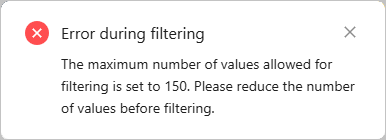
Improve the error when filtering on too many values
When filtering products, you can now select up to 150 values per filter. To assist you in refining your searches, we've enhanced the error messages to provide clearer guidance.
📥 Publication/Collect
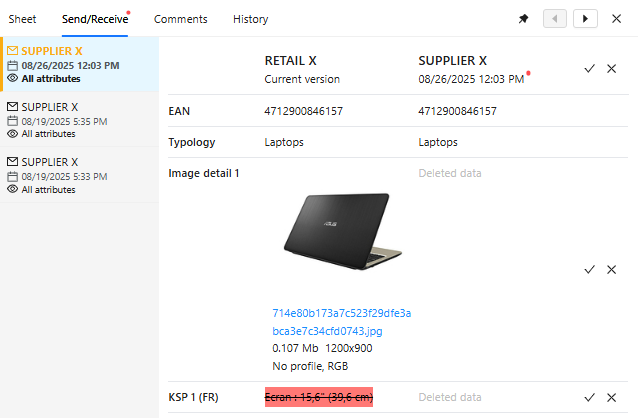
Fix an issue preventing to see which data was deleted from suggestion
When your partner suggests deleting certain product data, the interface now displays these in suggestions, empowering you to make informed decisions and enhance your product data quality.
💻 Visual Studio Code Extension
Add new skipReportGeneration parameter
The following tasks now offer the ability to skip report generation:
- Some performance improvements and minor bug fixes.
TIP
This extension can be downloaded from the Visual Studio Code Marketplace, do not hesitate to reach out to us if you have any feedback or questions.
August
22/08/2025
App: 5.59.0
Settings: 5.59.0
Resolved issues
🧰 Data Factory
Fix an issue reagrding the maximum filtering criterias of Data Factory table-export-items task
The maximum number of criteria applicable to the Data Factory table-export-items task is now accurately enforced. This enhancement prevents undesirable behavior and helps ensure optimal performance.
21/08/2025
App: 5.59.0
Settings: 5.59.0
Improvements
💻 User Experience
Improve Composite fields navigation
You can now seamlessly navigate between the various composite child fields and across multiple records by returning to the parent field's previous scroll position. This enhancement simplifies the process of exploring different records and improves overall navigation efficiency.
The Composite field is in phase. You can contact the Product-Live team at contact@product-live.com if you want more details and get an early access.
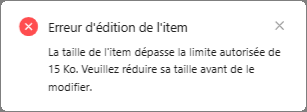
Improve error message when item is too big
To enhance your performance and assist you in completing your products more effectively, you now have clear indicators when your product data becomes too large. If you need guidance on optimizing your data structure, please don’t hesitate to reach out to the Product-Live team at contact@product-live.com. We're here to help you improve and streamline your products.
Resolved issues
🌐 API
Fix an issue on Items API related to Composite field
When your products include Composite fields, you can now retrieve them using the Items API. This enhancement enables you to automate your processes seamlessly with your other systems.
The Composite field is in phase. You can contact the Product-Live team at contact@product-live.com if you want more details and get an early access.
Fix find parameters on Find APIs
All operators in the Find APIs now accurately respond to your specified parameters, covering every documented property.
💻 User Experience
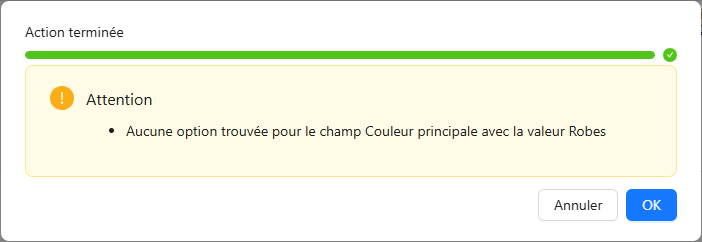
Improve error message when copying invalid option or category
To help you better understand when and why some of your data cannot be copied we improved the error message to provide you more guidance.
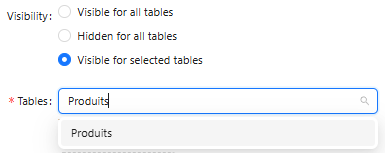
Resolved an issue preventing to search tables when selecting job visibility
In your account administration, you can now efficiently search for tables to define where your job needs to be visible.
🧰 Data Factory
Fix an issue on the maximum of exportable items
The maximum parameter of the Data Factory task table-export-items is now correctly enforced, taking into account the limits on items per partition and exportable items.
05/08/2025
App: 5.58.0
Settings: 5.54.0
Improvements
📥 Publication/Collect
Automatically apply suggested value deletion
You can now automate the application of suggested deleted values provided by your partners, enabling advanced capabilities to streamline your referencing and enrichment collection processes, thereby reducing manual workload.
🗃️ Traceability
Improve item history performances
The item history consultation is now faster than ever, allowing you to quickly access information about value changes and their origins, thereby streamlining your investigations.
The item history is in phase. You can contact the Product-Live team at contact@product-live.com if you want more details and get an early access.
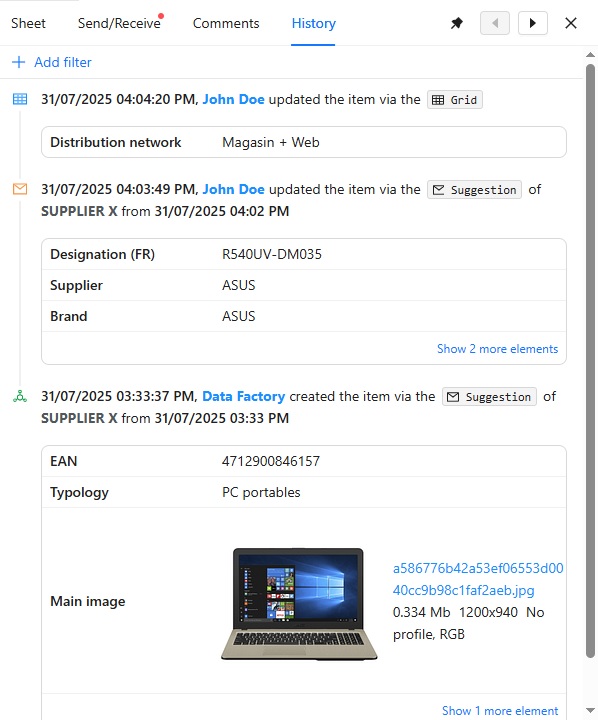
Know which suggestion has created the product
Understanding when your product was created and which values were set is valuable. However, knowing its origin is even more beneficial. Now, you can identify which partner published the product and when, enabling you to conduct your investigations more efficiently.
The item history is in phase. You can contact the Product-Live team at contact@product-live.com if you want more details and get an early access.
Know which suggestion has updated the product
Understanding when your product was updated and which values were set is valuable. However, knowing its origin is even more beneficial. Now, you can identify which partner suggestion was used to update the product, enabling you to conduct your investigations more efficiently.
The item history is in phase. You can contact the Product-Live team at contact@product-live.com if you want more details and get an early access.
Resolved issues
⛰ Multi-niveau
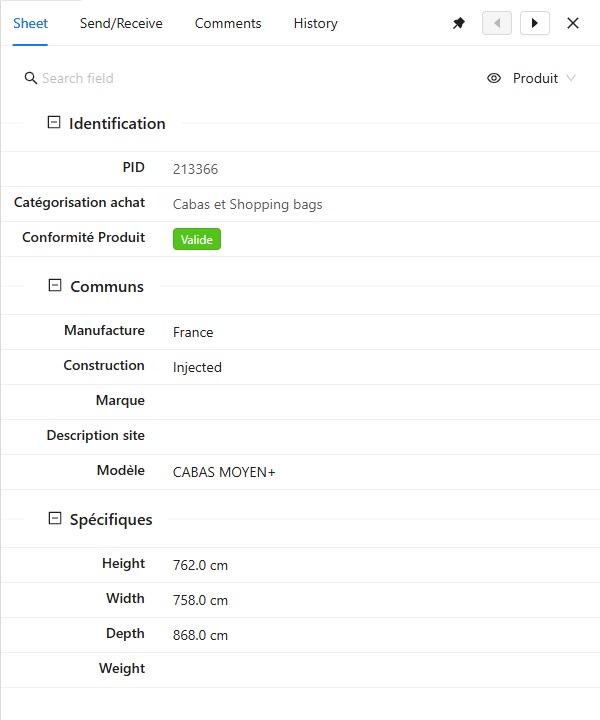
Fix detail view for multi-levels items
Now, at any product level, you can view specific fields directly within the detail view. This allows you to access all relevant information seamlessly, eliminating the need to return to the grid and switch screens.
July
29/07/2025
App: 5.57.0
Settings: 5.54.0
Resolved issues
🧰 Data Factory
Fix a Data Factory file issue
The output files generated by the Data Factory periodic jobs are now accessible for use in subsequent job tasks, facilitating the development of more advanced workflows and processes.
24/07/2025
App: 5.57.0
Settings: 5.54.0
Resolved issues
🧰 Data Factory
Fix category parent update issue
Now, when you reorganize your classification categories, the parent category is accurately updated whenever a subcategory is moved to the first level.
Fix Data Factory periodic job issue
In some cases, a Data Factory job scheduled to run on a specific date could run multiple times. We have addressed this issue so that a job runs only once.
🗃️ Traceability
Fix an issue preventing to see item history field whole value
When reviewing changes made to a product, you can now accurately view the complete field value for each modification.
The item history is in phase. You can contact the Product-Live team at contact@product-live.com if you want more details and get an early access.
💻 User Experience
Fix a copy/paste issue on html text cells
Regardless of the HTML property content copied on a product, grid usage is not blocked, allowing you to complete your activities seamlessly.
15/07/2025
App: 5.55.0
Settings: 5.54.0
Improvements
🌐 API
Handle composite fields in Product-Live APIs
Access to composite fields is now available through the Fields, Items, and Screen Columns APIs. This enhancement enables you to programmatically manage items containing [composite] fields, providing greater flexibility and control in your workflows.
The Composite field is in phase. You can contact the Product-Live team at contact@product-live.com if you want more details and get an early access.
🗃️ Traceability
Include item creation events when triggered by a collect
You can now precisely determine when an item was created by your partner and view the specific product properties that have been updated in the items history. This enhancement provides you with a comprehensive overview of each product's lifecycle, from inception to completion.
The item history is in phase. You can contact the Product-Live team at contact@product-live.com if you want more details and get an early access.
Resolved issues
🧰 Data Factory
Fix Data Factory timeouts
The Data Factory tasks table-export-items and refresh_items no longer unexpectedly timeout, ensuring that the requested actions are completed successfully.
🗃️ Traceability
Changed an incorrect icon
When a product is updated by applying a suggestion, the envelope icon now appears in the items history, consistent with its display in the grid and the Send/Receive pane.
💻 User Experience
Fix an issue preventing to see all available actions
With access to a wide range of actions, you can now browse through all of them seamlessly, regardless of your screen size.
Fix an issue preventing to copy/paste date and time value as they appear
Your date and time settings are now accurately applied when copying values from date or date-time properties.
03/07/2025
App: 5.54.0
Settings: 5.54.0
Improvements
🌠 Performance
Improve performances of Quick Import, delete item and refresh item (after table update)
Performance have been improved on following actions Quick Import, the deletion of item and the refresh of items after a table update. This will allow you to quickly keep up to date your product catalog shared with your partner.
Improve Data Factory pipeline performances
Improve overall perforamances of Data Factory pipeline, reducing risks of stuck job executions.
02/07/2025
App: 5.53.1
Settings: 5.37.1
Planned interruption of all services between 18:30 and 21:30 CET (Paris time zone)
Maintenance of the Product-Live platform will take place during this period. This maintenance will result in a complete unavailability of our applications (app.product-live.com, api.product-live.com, and settings.product-live.com).
For more information, please visit our status page.
Improvements
🌐 API
New User Groups API
You can now manage your teams in Product-Live using the API. This feature allows you to automate processes and synchronize your systems seamlessly, significantly reducing the tedious manual tasks associated with managing user rights.
🧰 Data Factory
Composite fields Conditional Formatting
It is now possible to define conditional formatting on composite fields and their constituent fields.
This enhancement allows you to enforce data quality standards on structured data, ensuring that only valid products progress further in the commercialization process.
The Composite field is in phase. You can contact the Product-Live team at contact@product-live.com if you want more details and get an early access.
💻 User Experience
Enhanced table navigation
Table navigation is now fully integrated with the overall navigation system across accounts, contexts, partitions, and screens. This enhancement simplifies access, eliminating the need to navigate through multiple menus to find and select the data you want to view.
Resolved issues
🌐 API
Fix API response
When retrieving the count of elements via an API (such as items, suggestions, or comment threads), a common approach is to call each endpoint with the size parameter set to 0. This way, the response will include only the total number of elements without fetching any actual content.
💻 User Experience
Fix screen configuration reset
Resolved an issue where fields moved to a different section did not revert to their original section when resetting the screen configuration.
June
12/06/2025
App: 5.52.0
Settings: 5.37.0
Visual Studio Code Extension: 1.15.0
💻 Visual Studio Code Extension
Update protocol-http-perform task with new GCP parameters
The protocol-http-perform task now offers the ability to use Google Cloud Platform authentication.
- Some performance improvements and minor bug fixes.
TIP
This extension can be downloaded from the Visual Studio Code Marketplace, do not hesitate to reach out to us if you have any feedback or questions.
Improvements
🌐 API
New find action on Jobs API
You can now search for your Data Factory jobs by name, projet and pipeline just as you do in Settings. This enhancement helps you manage your Data Factory jobs more efficiently, streamlining their management.
💻 User Experience
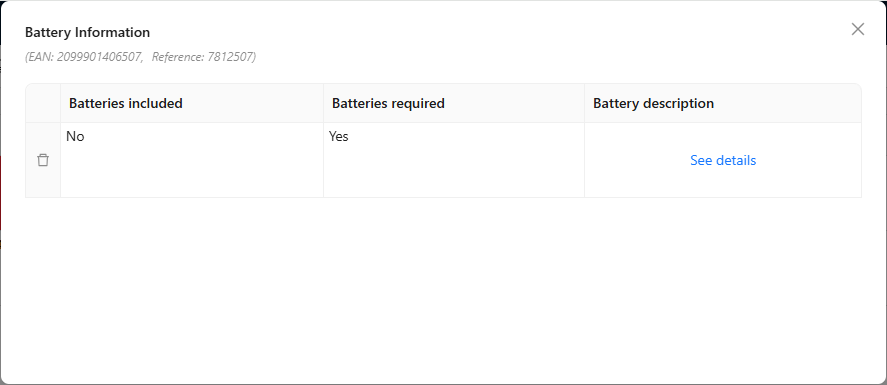
Customize item informations on Composite field display
Now, when editing composite fields, you can view the specific information you need to ensure you're editing the correct item. You have the flexibility to select which item fields are displayed within the composite field screen, similar to pinning columns in a grid. The first three (textual) pinned fields are displayed in the composite view for quick reference.
The Composite field is in phase. You can contact the Product-Live team at contact@product-live.com if you want more details and get an early access.
🧰 Data Factory
New GCP authentication
You can now execute HTTP requests using the Google Cloud Platform authentication method when utilizing the Data Factory http-protocol-perform task.
Data Factory protocol-http-perform task breaking change
We are updating the parameters of the Data Factory task protocol-http-perform. These changes only affect jobs that use the output=FILE option - all other existing jobs will continue to work without any modifications needed.
The output parameter is replaced by the responses parameter. Thanks to responses, it is now possible to specify which outputs the task should make available after execution. The JSON, STRING and FILE parameters make available the response.json, response.string and response.file outputs, respectively. On this occasion, the file output also disappears in favor of the response.file output. These changes are part of our ongoing efforts to standardize our APIs and tools.
Resolved issues
🎨 Conditional Formatting
Fix a conditioanal formatting issue
When reviewing the conditional formatting fields, you will now see the correct number of rules displayed for each field, eliminating previous discrepancies.
💻 User Experience
Fix a composite field display issue
Composite fields are now accurately rendered in shared tables.
The Composite field is in phase. You can contact the Product-Live team at contact@product-live.com if you want more details and get an early access.
03/06/2025
App: 5.51.0
Settings: 5.36.1
Planned slowdown of Data Factory services between 12:00 and 14:00 CET (Paris time zone)
Maintenance of the Product-Live platform will take place during this period. This maintenance will result in a slowdown unavailability of Data Factory during few minutes.
For more information, please visit our status page.
Improvements
🧰 Data Factory
Composite fields
A new Data Factory field type is now available: COMPOSITE.
A composite field streamlines the management of complex data by grouping related information into a single structured property, reducing clutter and improving organization.
Unlike multiple individual fields, it consolidates related data—such as battery details like presence, quantity, type, and composition—potentially including nested composite fields. It also supports storing multiple values simultaneously, like images or localized titles, enhancing data flexibility and usability.
You can now import and export COMPOSITE fields in your schema as well as import and export COMPOSITE fields values into your items.
The Composite field is in phase. You can contact the Product-Live team at contact@product-live.com if you want more details and get an early access.
Resolved issues
💻 User Experience
Suggestions display issue
Resolved an issue where item suggestions failed to display when exceeding a total of 500 suggestions.
Grid zoom issue
Resolved an issue that prevented item values from being visible when zooming in. Now, all item values are clearly displayed regardless of zoom level.
May
15/05/2025
App: 5.50.0
Settings: 5.36.0
Resolved issues
🔢 Formula
Fix an issue preventing to refresh Rules Engines rules with advanced template
Resolved an issue that was preventing the refresh of item fields value when field is a target of an advanced Rules Engines rule.
14/05/2025
App: 5.50.0
Settings: 5.36.0
💻 User Experience
General Availability
The new navigation and the screen customization are now in phase! Everyone one of you can now benefit from these new capabilities.
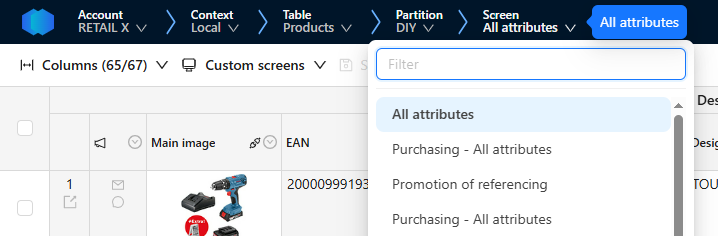
You can now easily navigate between different tables, partitions and screens directly from the header menu.
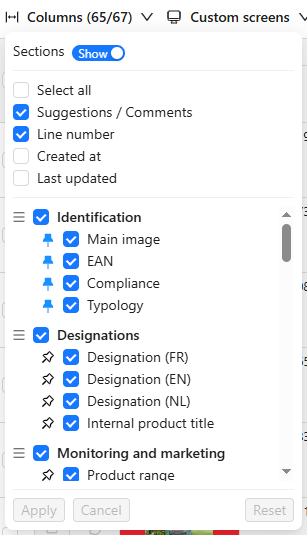
You can easily pin and unpin columns to keep important data visible while scrolling, using the "Columns" menu or the header menu for each column.
You can also reorder columns and screen sections, ensuring that essential data, such as the EAN, category, main image, and other columns, are visible as needed. To do this, simply drag the relevant column to the desired location.
All this will give you greater flexibility in using the table.
13/05/2025
App: 5.50.0
Settings: 5.36.0
Planned interruption of all services between 12:00 and 13:00 CET (Paris time zone)
Maintenance of the Product-Live platform will take place during this period. This maintenance will result in a complete unavailability of our applications (app.product-live.com, api.product-live.com, and settings.product-live.com).
For more information, please visit our status page.
Improvements
🌐 API
Added a new Projects API enabling to get and search Data Factory projects through the API
You can now manage your Data Factory projects just as you do in Settings, allowing you to create, edit, and delete projects effortlessly. This enhancement helps you organize your Data Factory jobs more efficiently, streamlining their management.
🗃️ Traceability
Add new capability enabling to see items history
This new pane allows you to comprehensively review all modifications made to each item, offering detailed insights into when, who, and how product data was altered throughout its lifecycle. This enhancement simplifies the process of identifying and correcting inaccuracies efficiently.
The item history is in phase. You can contact the Product-Live team at contact@product-live.com if you want more details and get an early access.
🧰 Data Factory
Rich text field description
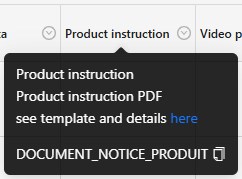
You can now add rich text in Fields description allowing to link guides and documentation to help filling the field
Add a new Data Factory task generate-report-mapping enabling to get details on how many fields are automated toward my partners
This new task allows you to generate a comprehensive report detailing which fields and options toward your partners are automated and how. It helps you understand what fields are still pending automation and the extent of current automation, thereby reducing manual field editing, improving efficiency and reducing errors.
Resolved issues
💻 User Experience
Fix an issue preventing to use user date and time preferences
Resolved an issue that was preventing App from utilizing user date and time preferences to display field values correctly.
Fix a display issue when all columns are pinned
Resolved an issue where selected columns were incorrectly displayed when all were pinned.
The screen customization are in phase. You can contact the Product-Live team at contact@product-live.com if you want more details and get an early access.
Fix cell copy using drag down
Resolved an issue preventing to copy a cell value when dragging its value while being saved
🧰 Data Factory
Fix an issue with Data Factory variable
Resolved an issue preventing the use of a Data Factory variable at job execution
April
25/04/2025
💻 Visual Studio Code Extension
Add new set-variable Data Factory task.
The set-variable Data Factory enables you to set a variable local to a job execution. This task is particularly useful for managing the flow of your Data Factory jobs, allowing you to store and manipulate data as needed.
Introduced the new wait Data Factory task.
The wait task in Data Factory allows you to pause the execution of your job for a specified duration. This feature is particularly useful when you need to introduce delays between tasks.
- Some minor improvements and bug fixes.
TIP
This extension can be downloaded from the Visual Studio Code Marketplace, do not hesitate to reach out to us if you have any feedback or questions.
24/04/2025
App: 5.49.0
Settings: 5.35.1
Resolved issues
🧰 Data Factory
- Fixed a bug that caused periodic jobs to be triggered multiple times in some cases
23/04/2025
App: 5.49.0
Settings: 5.35.1
Resolved issues
🧰 Data Factory
- Fixed a bug that caused empty fields to appear in export items under certain conditions
- Fixed an anomaly that prevented the use of conditions in formulas sourced from HTML fields
- Update of our Data Factory job scheduling tool. This update will enable us to track errors in periodic job triggers more effectively.
17/04/2025
App: 5.48.1
Settings: 5.35.1
Resolved issues
💻 User Experience
- Fix an issue which deleted user date and time preferences
09/04/2025
App: 5.48.0
Settings: 5.35.1
Improvements
💻 User Experience
UI improvements on custom screens administration
We have enhanced the overall user interface for navigation across accounts, contexts, tables, partitions and screens. Additionally, we improved the screen customization to further streamline user experience.
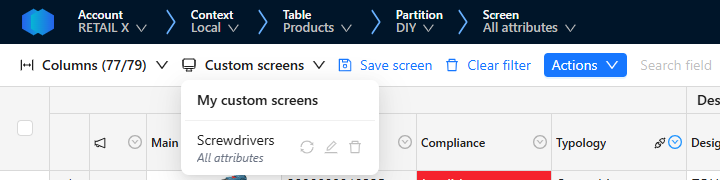
Both new navigation and screen customization are in phase. You can contact the Product-Live team at contact@product-live.com if you want more details and get an early access.
Resolved issues
🌐 API
Fix an issue preventing to create suggestions with files through Suggestions API when files
You can now generate suggestions from scratch by attaching files. You have two options: either share the public URL of the file you wish to suggest, or upload the file using the Data Factory Files API and utilize the uploaded file ID.
Made the content type and filename optional in Data Factory protocol-http-perform task
When utilizing the Data Factory protocol-http-perform task, you can now simplify your workflow by calling remote HTTP endpoints using only the file itself. There’s no longer a need to specify the filename or content type, as these are automatically inferred from the provided file.
💻 User Experience
Fix an issue preventing to save a new custom screen when filters are changed
In the new screen customization, you can now save as a new custom screen any changed filter or additional filter.
The screen customization is in phase. You can contact the Product-Live team at contact@product-live.com if you want more details and get an early access.
Fix date and time format handling when editing and pasting values in App
In the app, when copying and editing date and date-time attributes, you can now utilize both the ISO 8601 format and the date and time formats specified in your settings.
07/04/2025
💻 Visual Studio Code Extension
Add new rules-engine-generate-rules-report Data Factory task.
The rules-engine-generate-rules-report Data Factory task enables you to produce a comprehensive report that provides insights into the Rules Engine rules associated with a specific table. This report facilitates your understanding of the number of attributes that have automated and identifies those that still need to be mapped.
Introduced the new table-refresh-items Data Factory task.
The table-refresh-items task in Data Factory allows you to manually trigger the refresh of formulas and conditional formatting rules for a designated set of items. This feature is especially beneficial when automatic refresh is intentionally disabled to enhance the speed of table updates.
- Some minor improvements and bug fixes.
TIP
This extension can be downloaded from the Visual Studio Code Marketplace, do not hesitate to reach out to us if you have any feedback or questions.
02/04/2025
App: 5.47.0
Settings: 5.35.1
Improvements
🌠 Performance
Increase the support of higher images resolution up to 50 MP (megapixels)
You can now upload higher resolution images to Product-Live. You have several methods: the Data Factory table-import-items task, the Items or Data Factory Files APIs, or directly through the interface.
This enhancement allows you to upload images directly from your systems, which can then be reformatted in Product-Live to meet your partner's requirements using the Rules Engine or the Images API.
💻 User Experience
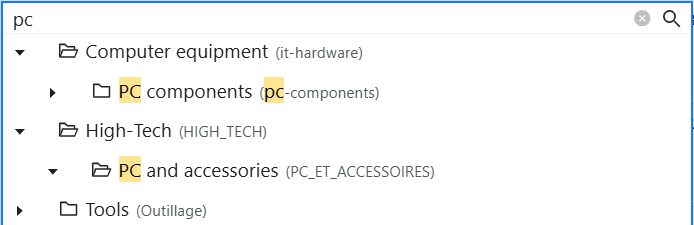
Improve classifications edition by unfolding the category tree when searching a category by name
Choosing the right product category can often be challenging due to the extensive list of categories available. To simplify this process, you can now easily search for your product's category by entering its name. This will display all matching values, making it easier for you to browse and select the appropriate category.
Resolved issues
💻 User Experience
Fix an issue preventing getting correct results when filtering on multiple Conditional Formatting status
When there are no items with the default conditional formatting status, but some with a different status, you may not have seen any results if you filtered on both statuses. This issue is now addressed by displaying all items, matching either conditional formatting status.
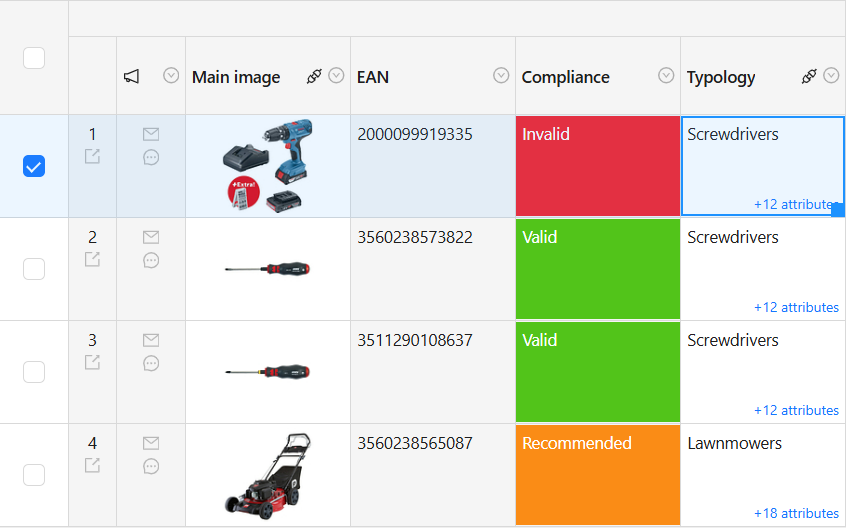
Highlight selected lines on the grid
We reintroduce the ability to see which lines are selected. This will help you better understand which items you see and simplify data editions and verifications.
🧰 Data Factory
Fix an issue preventing the Data Factory table-export-items task to complete
An incorrect technical parameter may have caused the Data Factory table-export-items task to time out when exporting a large number of items. This parameter has now been corrected, allowing for the successful export of multiple items simultaneously.
March
28/03/2025
App: 5.46.0
Settings: 5.35.0
Resolved issues
🧰 Data Factory
Fix an issue preventing the Data Factory table-import-schema to complete
When erroneous formula rules were present in the schema for import, the process halted prematurely. As a result, the conditional formatting status of the items could not be refreshed. This issue is now resolved, and the import process successfully completes with the conditional formatting status correctly refreshed.
27/03/2025
App: 5.46.0
Settings: 5.35.0
Improvements
🧰 Data Factory
- Increase Data Factory
table-refresh-itemsandtable-import-schematimeout to ensure full table item refresh
26/03/2025
App: 5.46.0
Settings: 5.35.0
Improvements
👤 User Management
- Improve accounts list performance when many accounts are available
💻 User Experience
- Improve Saved Filters enabling to save full screen customization including frozen, hidden and reordered columns
- Improved screen personalization by enabling to pin columns from header menu
- Simplify option list fields filtering
🔢 Formula
- Improve Rules Engine enabling to perform advanced Formulas
- Improve Conditional Formatting rules enabling to check quantity on multiple select lists
Resolved issues
🧰 Data Factory
- Fix an issue causing Data Factory
table-export-itemsto take longer than required
19/03/2025
App: 5.45.0
Settings: 5.35.0
Improvements
🌐 API
- Enhance the
FieldAPI enabling to get specific field and update its definition - Enhance Product-Live APIs with
Screen ColumnsAPI - Enhance Product-Live APIs with
SectionsAPI
💻 User Experience
- Improve Data Factory job execution search performance
- Improved specific attributes access with inline category filter
Resolved issues
🌐 API
- Fix an issue preventing to edit Data Factory jobs in Settings when creating with the Jobs API
💻 User Experience
- Fix an issue preventing to see job outputs and reports in Settings
- Fix an issue preventing to copy/paste values in the right cells
12/03/2025
App: 5.44.0
Settings: 5.34.0
Improvements
🌐 API
- Enhanced Partitions, Screens, Item Link, Level APIs to more easily specify which table to look into
- Added a new
FieldAPI enabling to get and search all table fields through API - Added a new
Field ValueAPI enabling to get and search categories and options through API - Added a new
Matrix FieldAPI enabling to get and search fields matrix through API
💻 User Experience
Screen customization
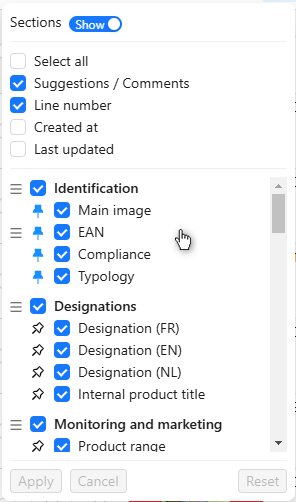
We keep empowering you to personalize your screen by allowing you to reorder columns to suit your preferences. This feature enables you to arrange the columns in a way that best reflects your activities, ensuring that they are displayed in a relevant and organized manner.
The screen customization is in phase. You can contact the Product-Live team at contact@product-live.com if you want more details and get an early access.
Improve Sections visibility keeping their title always visible
Fix an issue preventing to refresh Data Factory Jobs execution status in Settings
Fix an issue preventing to see which columns are filtered in App
🧰 Data Factory
- Fix an issue preventing the Data Factory
rules-engine-execute-rulesto complete due to high volumes
06/03/2025
App: 5.43.3
Settings: 5.33.0
Resolved issues
💻 User Experience
- Fix an issue preventing to filter Data Factory job executions in Settings
05/03/2025
App: 5.43.3
Settings: 5.33.0
Improvements
🌐 API
- Improved
Tables,PartitionsandScreensapis with the ability to search and filter results
Resolved issues
💻 User Experience
- Fix an issue not displaying the right number of columns displayed on screen
- Fix an issue not updating specific fields conformity status on the detail view when editing them
🧰 Data Factory
- Fix an issue preventing to generate execution report of the Data Factory
table-import-schematask
February
26/02/2025
App: 5.43.0
Settings: 5.33.0
Planned interruption of all services between 18:00 and 20:30 CET (Paris time zone)
Maintenance of the Product-Live platform will take place during this period. This maintenance will result in a complete unavailability of our applications (app.product-live.com, api.product-live.com, and settings.product-live.com).
For more information, please visit our status page.
Improvements
💻 User Experience
Screen customization
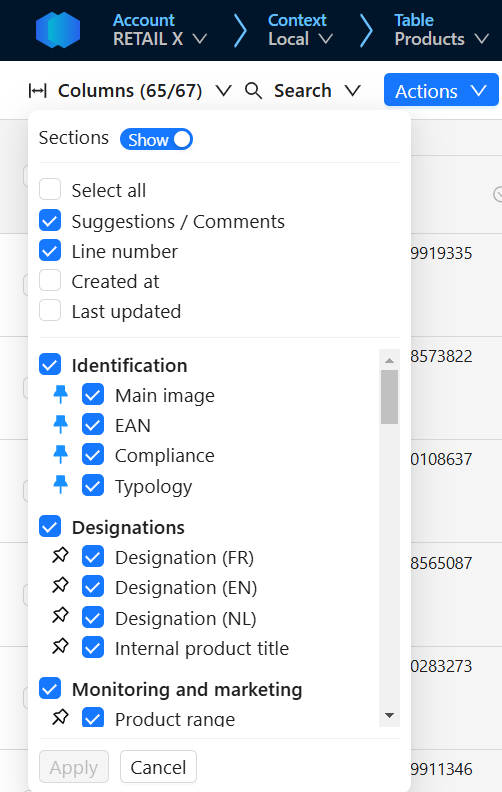
We empower you to personalize your screen with the ability to pin and unpin columns according to your needs. This feature allows you to pin the columns that matter most, enabling you to scroll through your product data while keeping the essential context for your tasks in view.
This screen customization is in phase. You can contact the Product-Live team at contact@product-live.com if you want more details and get an early access.
Resolved issues
🌉 Mapping
- Fix an issue preventing to deselect a field in a Rules Engine action
🎨 Conditional Formatting
- Fix an issue when filtering items on conformity when no matching item is found
📥 Publication/Collect
- Fix an issue displaying Suggestions fields not in the same order as the screen
🗨️ Comments
- Fix the system comment thread closing by removing the need to provide a message
💻 User Experience
- Fix an issue preventing to display specific attributs when filtering on classification
19/02/2025
App: 5.42.0
Settings: 5.33.0
Improvements
💻 User Experience
Improve Table, Partition & Screen navigation
We continue improving navigation by enabling to open contexts, tables, partitions and screens in a new tab in one click. This enhancement aims to simplify the use of Product-Live in multiple tabs side-by-side in order to facilitate the comparison of product data between various contexts and screens.
This new navigation is in phase. You can contact the Product-Live team at contact@product-live.com if you want more details and get an early access.
Resolved issues
🌉 Mapping
- Fix an issue preventing to create additional rules on fields
- Fix an issue in displaying all possible options when conditioning Rules Engine rules on a list of options
🌐 API
- Fix an issue preventing to see all API keys defined on the account
🌠 Performance
- Fix an issue preventing to complete massive table imports with Data Factory
table-import-schematask
💻 User Experience
- Fix an issue in displaying changed text value in suggestions
- Fix an issue preventing to save deselected unauthorized options in a multiple choice field target of a dynamic list
- Fix an issue in teams and partner groups permissions preventing to authorize Data Factory jobs
🗨️ Comments
- Fix an issue creating twice system comment threads when an item cannot be published
- Fix an issue preventing to close system comment threads
13/02/2025
App: 5.41.1
Settings: 5.32.0
Resolved issues
💻 User Experience
- Fix an issue in the detail view preventing to display the correct conformity status on fields and to change edited field
12/02/2025
Planned interruption of all services between 18:00 and 20:00 CET (Paris time zone)
Maintenance of the Product-Live platform will take place during this period. This maintenance will result in a complete unavailability of our applications (app.product-live.com, api.product-live.com, and settings.product-live.com).
For more information, please visit our status page.
11/02/2025
App: 5.41.0
Settings: 5.32.0
Improvements
🌉 Mapping
Rules Engine automation completion rate report
We introduce a new Data Factory task generate-report-mapping enabling you to export a report of automated fields for each of your retailers. That will help you ensure that all relevant data is automatically filled for your retailers and which data remains to automate in order to reduce manual actions and errors rate.
Rules Engine form
We improved the Rules Engine form, saving rules each time a rule is set and not after all rules are set.
💻 User Experience
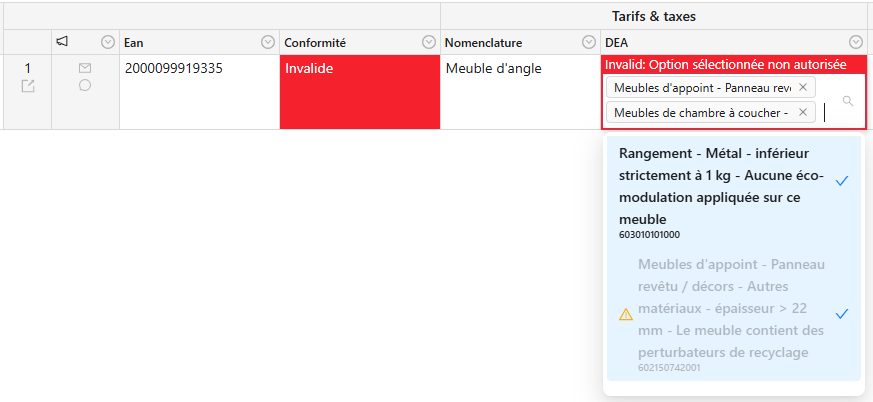
Dynamic lists on multiple selects
We improved visibility on restricted options in multiple select fields subject of dynamic list.
Improve Table, Partition & Screen navigation
We continue improving navigation by expanding it to include tables, partitions, and screens. This enhancement aims to increase your awareness of your current context and simplify the switching between different data, allowing you to easily access all the information needed to fill out and verify your products.

This new navigation is in phase. You can contact the Product-Live team at contact@product-live.com if you want more details and get an early access.
Resolved issues
🌉 Mapping
- Fix an issue in the Rules Engine preventing to copy the source item quantity and comment from multiple select lists
💻 User Experience
- Fix an issue in displaying sections title too high
06/02/2025
App: 5.40.1
Settings: 5.32.0
Visual Studio Code Extension: 1.12.0
Improvements
🧰 Data Factory
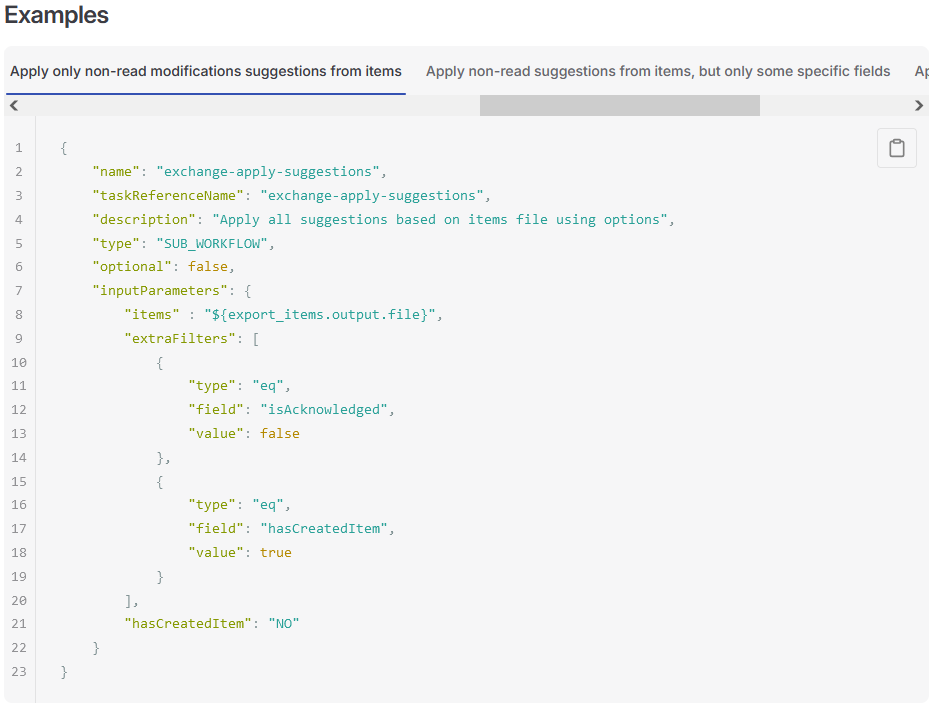
Advanced filter to automate suggestions application
We have enhanced the Data Factory exchange-apply-suggestions by introducing advanced filters for managing suggestions. These filters mirror those available in the Suggestions API, allowing for comprehensive control over which suggestions to apply based on their various characteristics.
Visual Studio Code Extension
- Add the new parameters of the Data Factory
exchange-apply-suggestionsa described here.
January
30/01/2025
App: 5.40.0
Settings: 5.32.0
Improvements
🔢 Formula
Generate a link to related items on another table
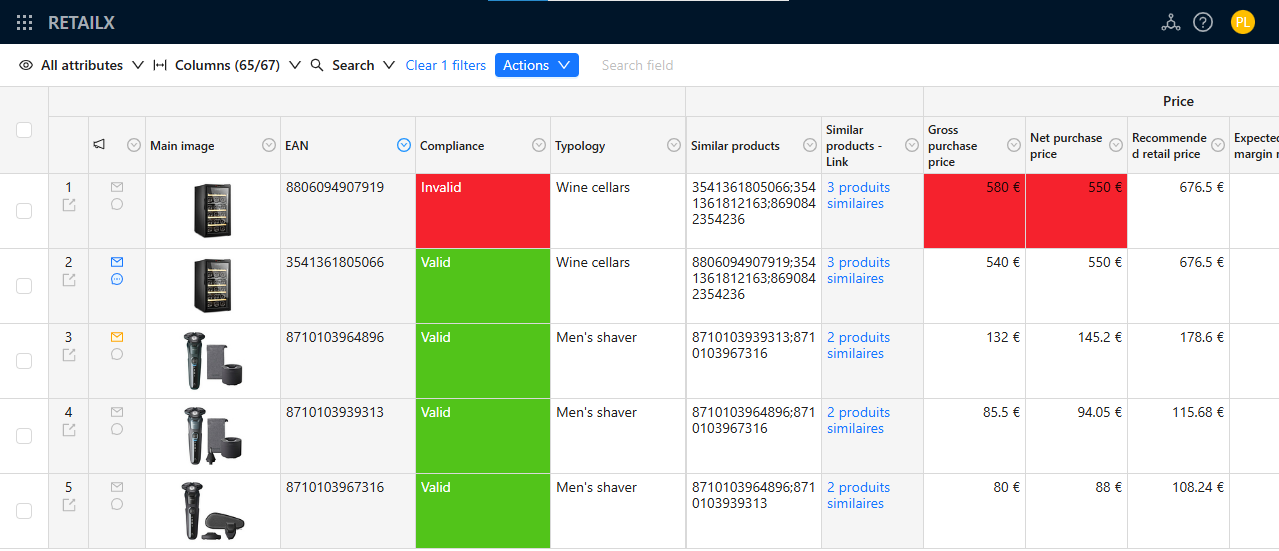
We improved the Rules Engine with two new functions base64_encode and base64_decode enabling you encode and decode texts in base64. If you manage more types of items than just products such as logistics units, spare parts, prices... you may want to easily access to the related items without having to apply the same filters on the other table. With these new capabilities you can now automatically generate the access links on your items with Formulas. See en example here
💻 User Experience
Improve Table, Partition & Screen navigation
We introduce a new way for navigating between accounts and contexts, enhancing your awareness of your current context. This is an initial step designed to streamline navigation through the various items, logistics units, etc. you need to complete and manage accross all of your partners.

This new navigation is in phase. You can contact the Product-Live team at contact@product-live.com if you want more details and get an early access.
Resolved issues
🌉 Mapping
- Fix an issue preventing to see Rules Engine rules on fields when the source table is not linked anymore.
📥 Publication/Collect
- Fix an issue preventing to open suggestion in the Send/Receive view
💻 User Experience
- Fix an issue displaying the same items on multiple pages in App
28/01/2025
App: 5.39.2
Settings: 5.31.1
Resolved issues
🌐 API
- Fix an issue updating the wrong job periodicity when create a new job with the Data Factory
Jobsapi
27/01/2025
App: 5.39.2
Settings: 5.31.1
Resolved issues
🧰 Data Factory
- Fix an issue preventing the api key automatic generation during a Data Factory
protocol-http-performtask
22/01/2025
App: 5.39.2
Settings: 5.31.1
Improvements
🔢 Formula
- Improve the Rules Engine enabling to define dynamic lists on all types of multiple select fields
🧰 Data Factory
- Improve the Data Factory
exchange-apply-suggestionstask by simplifying the configuration and enabling to filter suggestions to manage
Resolved issues
💻 User Experience
16/01/2025
App: 5.38.1
Settings: 5.31.0
Resolved issues
💻 User Experience
- Fix an issue preventing to see specific attributes when filtering on a category
15/01/2025
App: 5.38.0
Settings: 5.31.0
Visual Studio Code Extension 1.11.0
Improvements
🌐 API
- Improve
Items,PublicationsandSuggestionsAPI body structure for better manipulation
🌉 Mapping
- Improve Rules Engine interface hiding "Do not map" options and categories when hiding mapped ones
Resolved issues
🌉 Mapping
- Fix an issue displaying incorrect field automation status when cancelling Rules Engine rules creation and update
- Fix an issue displaying correct field automation status when deleting Rules Engine rules
💻 User Experience
- Fix an issue in the text filter preventing to easily provide multiple values
- Fix an issue in copy/pasting multiple cells at once
- Fix an issue when filtering the grid while it is charging
- Fix an issue preventing to see Data Factory job execution details in Settings
Visual Studio Code Extension
- Add new input to
rules-engine-execute-rulestask.importComputedItemsallows compute new items without applying them. - Add new inputs to
exchange-apply-suggestionstask .tableandscreensallows to specify the table and screens to apply suggestions on. - Add new input to
protocol-http-performtask.authenticationallows to specify the authentication method to use. The authentication methodPL_KEYis now available and allow to automatically authenticate a request against Product-Live API.
This extension can be downloaded from the Visual Studio Code Marketplace, do not hesitate to reach out to us if you have any feedback or questions.
07/01/2025
App: 5.37.1
Settings: 5.30.0
Improvements
🌐 API
- Enable the use of automatically generated api key on the current account in Data Factory tasks, such in:
protocol-http-perform, all Content tasks and all Job Context tasks - Enable the automatic use of the current account api key in Data Factory
protocol-http-performtask
🧰 Data Factory
- Improve the Data Factory
rules-engine-execute-rulestask enabling to get the computed items without automatically applying them
📥 Publication/Collect
- Improve the Collect (envelop) icon color to show only if visible suggestions remains to be read
Resolved issues
🌐 API
- Fix a
SuggestionsAPI error message when a suggestion cannot be created - Fix an issue preventing to create suggestions with
SuggestionsAPI from publications
🌉 Mapping
- Fix an issue displaying multiples times the same category in the Rules Engine interface
- Fix an issue in displaying the option to ignore a field in the Rules Engine when deleting existing rules