
Table properties
What are table properties?
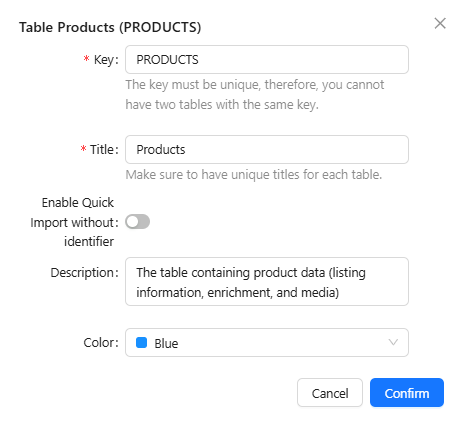
Table properties define how a table is identified and presented to its users: its key, its title, its description. They also include the option to allow the Quick Import without identifier.
Without table edition, changing a table property requires a Data Factory job. Only technical teams have the skills to do it, so even a simple wording change means a request, a wait and a dependency on them. With table edition, administrators make these changes themselves in a few clicks.
Why and when to use it?
A table with an unclear title or no description makes it harder for your users and partners to find the right table and understand what it contains. When several tables look alike, they may fill in the wrong one.
Table edition lets you clarify a table as soon as you spot the problem, without technical help, and the change is visible immediately.
You might need it:
- To rename a table with a title that speaks to your users and partners
- To explain in the description what the table contains and who it is for
- To let users create items with the Quick Import without mapping an identifier
How to use it?
Who can edit table properties?
Only administrators can edit table properties. If you do not see the Edit properties option, contact your administrator.
Edit the table properties
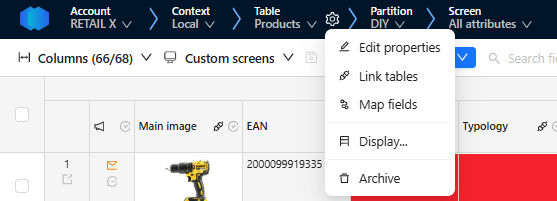
- Open a table and click on the gear icon next to the table name in the breadcrumb
- Click
Edit properties - The editor opens with the current values of the table. Edit the properties you need:
- Key: the unique identifier of the table. Two tables cannot have the same key
- Title: the name of the table displayed to users. Use a unique title for each table
- Enable Quick Import without identifier: allows users to import items with the Quick Import without selecting an identifier
- Description: what the table contains and who it is for
- Click
Confirmto save your changes, orCancelto discard them
Your changes are visible immediately to every user who has access to the table.
Scope
WARNING
- Only administrators can edit table properties
- Key and Title are mandatory
- ⚠️ Changing the key of a table may break the Data Factory jobs and integrations that reference it. Check with your technical team before changing it
- Translations of the title and description cannot be edited from this screen. Use the Data Factory
table-import-schematask - To edit the fields of the table, see Field edition
FAQ
Will my changes be overwritten by the next table structure import?
Yes. Changes made from the application are not kept if the table structure is imported again with the Data Factory table-import-schema task.
Do my suppliers see my changes?
Yes. Your changes are visible immediately to every user who has access to the table, including your partners on shared tables.
Why can I not see the "Edit properties" option?
Table edition is reserved for administrators. If you are an administrator and still cannot see it, contact your customer success to check that the feature is enabled on your account.
What happens when I enable the Quick Import without identifier?
Users can import items with the Quick Import without selecting an identifier. Without an identifier, existing items cannot be found, so each line of the file creates a new item. Keep this option disabled if your users mainly update existing items, to avoid duplicates.