
March
31/03/2026
App: 5.80.0
Settings: 5.80.0
Improvements
🌐 API
Improve Items API
Items api have been improved by requiring the partition to be mentioned so that you can retrieve more easily and faster your items for advanced workflow.
🧰 Data Factory
Improve Data Factory protocol-http-perform task
The Data Factory protocol-http-perform task now handles additional parameters enabling you to connect to more end points and using advanced HTTP configurations.
📥 Publication/Collect
Apply suggested composite fields on your products
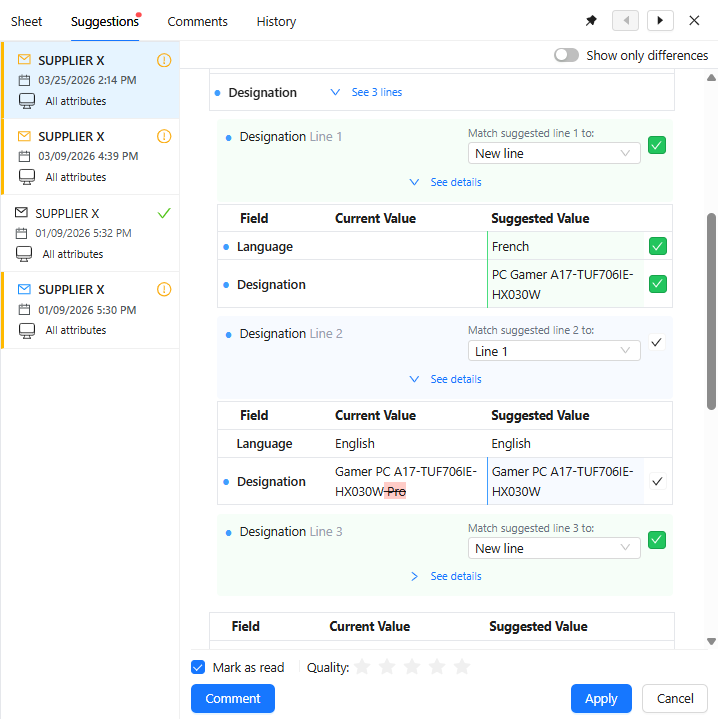
It is now possible to apply suggested composite fields through the Suggestion api enabling you to updates your products with the suggested values from your partners including complex data.
Improve Suggestions with composite fields
You can now collect suggested data on your products including composite fields. In the suggestions you can see each composite suggested line and field as well as the recommended matched lines helping you easily accept and apply suggested values on your products increasing their data quality.
Resolved issues
🧰 Data Factory
Fix a refresh items issue
When there are amny items to refresh on multi-levels tables, the Data Factory task will now complete successfully.
🔢 Formula
Fix a Rules Engine refresh issue
If a composite fields is used as a source of a rule, when a line of that composite field is deleted, the rules now correctly refresh the value on the target field enabling you to keep seeing accurate values.
💻 User Experience
Fix an issue preventing to edit child composite fields
You can now edit any field within composite fields whatever their depth.
24/03/2026
Planned interruption of Product-Live Data Factory between 18:30 and 20:30 CET (Paris time zone)
As part of routine maintenance, we will be performing updates on our infrastructure.
During this window, job processing will be temporarily paused. All jobs are expected to resume automatically once maintenance is complete.
For updates and more information, please visit our status page
18/03/2026
App: 5.79.0
Settings: 5.79.0
Improvements
📥 Publication/Collect
Create suggestion with composite field from external systems
You can now create suggestions on your products from other systems (ERP, PIM, DAM...) with composite fields with the Suggestions API enabling you to easily update your products in Products-Live from your own systems.
bash
curl -X 'POST' \
  'https://api.product-live.com/v1/publications' \
  -H 'accept: */*' \
  -H 'X-Api-Key: <REDACTED>'
  -d '{
    "object": "suggestion-create",
    "itemId": "1958624",
    "screenId": "531059",
    "hasCreatedItem": true,
    "emitterName": "38643",
    "fields": [
      {
        "key": "ID",
        "value": {
          "data": "8710103533825"
        }
      },
      {
        "key": "TITLE",
        "value": {
        "data": [
          {
          "data": [
            {
              "key": "LOCAL_LANGUAGE",
              "value": {
                  "data": "FRA"
              }
            },
            {
              "key": "LOCAL_TITLE",
              "value": {
                  "data": "Smartphone 13 mini 5,4\"\" 5G 512 Go Double SIM Vert"
              }
            }
          ],
          "id": "01KJZ2B0RYBZ8NCMVXFRTTE9VK",
          "position": 0
          },
          {
          "data": [
            {
              "key": "LOCAL_LANGUAGE",
              "value": {
                  "data": "ENG"
              }
            },
            {
              "key": "LOCAL_TITLE",
              "value": {
                  "data": "Smartphone 13 mini 5.4\"\" 5G 512GB Dual SIM Green"
              }
            }
          ],
          "id": "01KJZ2B37XE4731VHS0AF8KZBN",
          "position": 1
          },
          {
          "data": [
            {
              "key": "LOCAL_LANGUAGE",
              "value": {
                  "data": "DEU"
              }
            },
            {
              "key": "LOCAL_TITLE",
              "value": {
                  "data": "Smartphone 13 mini 5.4\"\" 5G 512GB Dual SIM Groen"
              }
            }
          ],
          "id": "01KJZ2B3XYZJGVD8YHTB7Z4MCS",
          "position": 2
          }
        ]
        }
      }
    ]
}'json
{
  "object": "suggestion",
  "id": "2185",
  "updatedAt": "2022-05-13T07:54:59.000Z",
  "createdAt": "2022-05-13T07:54:55.000Z",
  "toItemId": "1958624",
  "hasCreatedItem": false,
  "isAcknowledged": false,
  "fromAccountId": "3568",
  "screenId": "531059",
  "fields": [
    {
      "key": "ID",
      "type": "IDENTIFIER",
      "value": {
        "data": "8710103533825"
      }
    },
    {
      "key": "TITLE",
      "type": "COMPOSITE",
      "multiValued": true,
      "value": {
      "data": [
        {
        "data": [
          {
            "key": "LOCAL_LANGUAGE",
            "type": "SINGLE-SELECT",
            "value": {
                "data": "FRA"
            }
          },
          {
            "key": "LOCAL_TITLE",
            "type": "SINGLE-LINE-TEXT",
            "value": {
                "data": "Smartphone 13 mini 5,4\"\" 5G 512 Go Double SIM Vert"
            }
          }
        ],
        "id": "01KJZ2B0RYBZ8NCMVXFRTTE9VK",
        "position": 0
        },
        {
        "data": [
          {
            "key": "LOCAL_LANGUAGE",
            "type": "SINGLE-SELECT",
            "value": {
                "data": "ENG"
            }
          },
          {
            "key": "LOCAL_TITLE",
            "type": "SINGLE-LINE-TEXT",
            "value": {
                "data": "Smartphone 13 mini 5.4\"\" 5G 512GB Dual SIM Green"
            }
          }
        ],
        "id": "01KJZ2B37XE4731VHS0AF8KZBN",
        "position": 1
        },
        {
        "data": [
          {
            "key": "LOCAL_LANGUAGE",
            "type": "SINGLE-SELECT",
            "value": {
                "data": "DEU"
            }
          },
          {
            "key": "LOCAL_TITLE",
            "type": "SINGLE-LINE-TEXT",
            "value": {
                "data": "Smartphone 13 mini 5.4\"\" 5G 512GB Dual SIM Groen"
            }
          }
        ],
        "id": "01KJZ2B3XYZJGVD8YHTB7Z4MCS",
        "position": 2
        }
      ]
      }
    }
  ],
  "deletedCompositeRows": [],
  "deletedFields": []
}💻 User Experience
Composite image & file field quick drag & drop
It is now possible within composite fields to quickly drag & drop files and images onto fields without having to open their editors allowing you to update your products faster.
Improve composite line uniqueness message
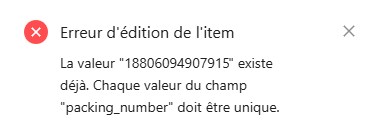
When a field is configured as unique within a composite field, you now have an explicite message informing you.
Enable composite usage at the same time as detail view and actions
It is now possible to open a composite field while keeping the detail view opened allowing you to easily see item composite field conformity while editing its values.
Improve composite fields navigation
You can now search fields within composite fields allowing you to easily find the required field to check and complete.
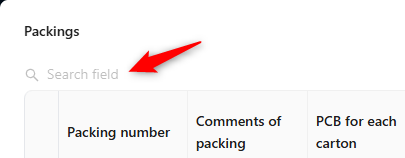
We also introduce a keyboard short Ctrl + Shift + F to search fields in the grid, in the detail view or in the composite field according to the active cell.
Improve composite field preview
You can now see how many records exist in a composite field allowing you to quickly see if there are as many records as required without opening it.

Resolved issues
📥 Publication/Collect
Fix an issue on the Suggestions api
When creating suggestions from publications with the Suggestions api, only the published deleted fields are added to the suggested deleted fields ensuring accurate suggested changes on your products.
12/03/2026
App: 5.78.0
Settings: 5.78.0
Improvements
🌐 API
Create publications with composite fields
It is now possible to create publications with composite fields through the Publications API enabling you to publish updates to your partners including complex data.
bash
curl -X 'POST' \
  'https://api.product-live.com/v1/publications' \
  -H 'accept: */*' \
  -H 'X-Api-Key: <REDACTED>'
  -d '{
    "fromItemId": "80303",
    "toAccountId": "6326",
    "screenId": "5642"
}'json
{
  "object": "publication",
  "id": "38643",
  "updatedAt": "2024-05-17T07:39:23.000Z",
  "createdAt": "2024-05-17T07:38:54.000Z",
  "sentAt": "2024-05-17T07:38:54.000Z",
  "fromItemId": "80303",
  "toAccountId": "6326",
  "tableId": "1353",
  "partitionId": "2342",
  "screenId": "7421",
  "status": "SENT",
  "fields": [
    {
      "key": "EAN",
      "type": "IDENTIFIER",
      "value": {
        "data": "3610011803438"
      }
    },
    {
      "key": "TITLE",
      "type": "COMPOSITE",
      "multiValued": true,
      "value": {
      "data": [
        {
        "data": [
          {
            "key": "LOCAL_LANGUAGE",
            "type": "SINGLE-SELECT",
            "value": {
                "data": "FRA"
            }
          },
          {
            "key": "LOCAL_TITLE",
            "type": "SINGLE-LINE-TEXT",
            "value": {
                "data": "Smartphone 13 mini 5,4\"\" 5G 512 Go Double SIM Vert"
            }
          }
        ],
        "id": "01KJZ2B0RYBZ8NCMVXFRTTE9VK",
        "position": 0
        },
        {
        "data": [
          {
            "key": "LOCAL_LANGUAGE",
            "type": "SINGLE-SELECT",
            "value": {
                "data": "ENG"
            }
          },
          {
            "key": "LOCAL_TITLE",
            "type": "SINGLE-LINE-TEXT",
            "value": {
                "data": "Smartphone 13 mini 5.4\"\" 5G 512GB Dual SIM Green"
            }
          }
        ],
        "id": "01KJZ2B37XE4731VHS0AF8KZBN",
        "position": 1
        },
        {
        "data": [
          {
            "key": "LOCAL_LANGUAGE",
            "type": "SINGLE-SELECT",
            "value": {
                "data": "DEU"
            }
          },
          {
            "key": "LOCAL_TITLE",
            "type": "SINGLE-LINE-TEXT",
            "value": {
                "data": "Smartphone 13 mini 5.4\"\" 5G 512GB Dual SIM Groen"
            }
          }
        ],
        "id": "01KJZ2B3XYZJGVD8YHTB7Z4MCS",
        "position": 2
        }
      ]
      }
    }
  ]
}:::
Create suggestions with composite fields
It is now possible to create suggestions with composite fields through the Suggestions API enabling you to collect updates from your partners including complex data. For now only new and updated composite fields lines and values can be collected. Deleted composite field lines cannot yet be collected.
bash
curl -X 'POST' \
  'https://api.product-live.com/v1/publications' \
  -H 'accept: */*' \
  -H 'X-Api-Key: <REDACTED>'
  -d '{
    "object": "suggestion-create",
    "itemId": "1958624",
    "screenId": "531059",
    "hasCreatedItem": true,
    "publicationId": "38643"
}'json
{
  "object": "suggestion",
  "id": "2185",
  "updatedAt": "2022-05-13T07:54:59.000Z",
  "createdAt": "2022-05-13T07:54:55.000Z",
  "toItemId": "1958624",
  "hasCreatedItem": false,
  "isAcknowledged": false,
  "fromAccountId": "3568",
  "screenId": "531059",
  "fields": [
    {
      "key": "ID",
      "type": "IDENTIFIER",
      "value": {
        "data": "8710103533825"
      }
    },
    {
      "key": "TITLE",
      "type": "COMPOSITE",
      "multiValued": true,
      "value": {
      "data": [
        {
        "data": [
          {
            "key": "LOCAL_LANGUAGE",
            "type": "SINGLE-SELECT",
            "value": {
                "data": "FRA"
            }
          },
          {
            "key": "LOCAL_TITLE",
            "type": "SINGLE-LINE-TEXT",
            "value": {
                "data": "Smartphone 13 mini 5,4\"\" 5G 512 Go Double SIM Vert"
            }
          }
        ],
        "id": "01KJZ2B0RYBZ8NCMVXFRTTE9VK",
        "position": 0
        },
        {
        "data": [
          {
            "key": "LOCAL_LANGUAGE",
            "type": "SINGLE-SELECT",
            "value": {
                "data": "ENG"
            }
          },
          {
            "key": "LOCAL_TITLE",
            "type": "SINGLE-LINE-TEXT",
            "value": {
                "data": "Smartphone 13 mini 5.4\"\" 5G 512GB Dual SIM Green"
            }
          }
        ],
        "id": "01KJZ2B37XE4731VHS0AF8KZBN",
        "position": 1
        },
        {
        "data": [
          {
            "key": "LOCAL_LANGUAGE",
            "type": "SINGLE-SELECT",
            "value": {
                "data": "DEU"
            }
          },
          {
            "key": "LOCAL_TITLE",
            "type": "SINGLE-LINE-TEXT",
            "value": {
                "data": "Smartphone 13 mini 5.4\"\" 5G 512GB Dual SIM Groen"
            }
          }
        ],
        "id": "01KJZ2B3XYZJGVD8YHTB7Z4MCS",
        "position": 2
        }
      ]
      }
    }
  ],
  "deletedCompositeRows": [],
  "deletedFields": []
}:::
📥 Publication/Collect
Improve Publications with composite fields
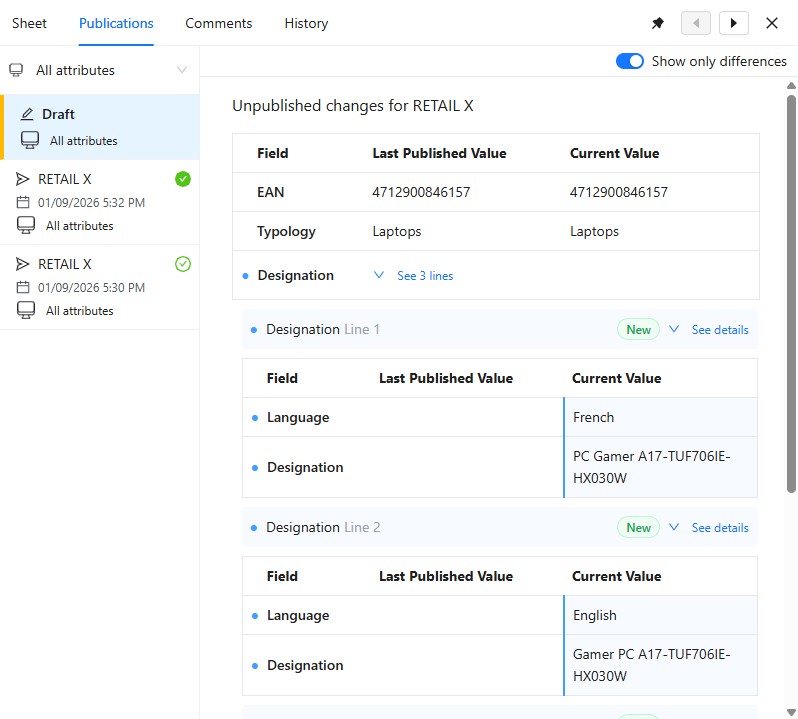
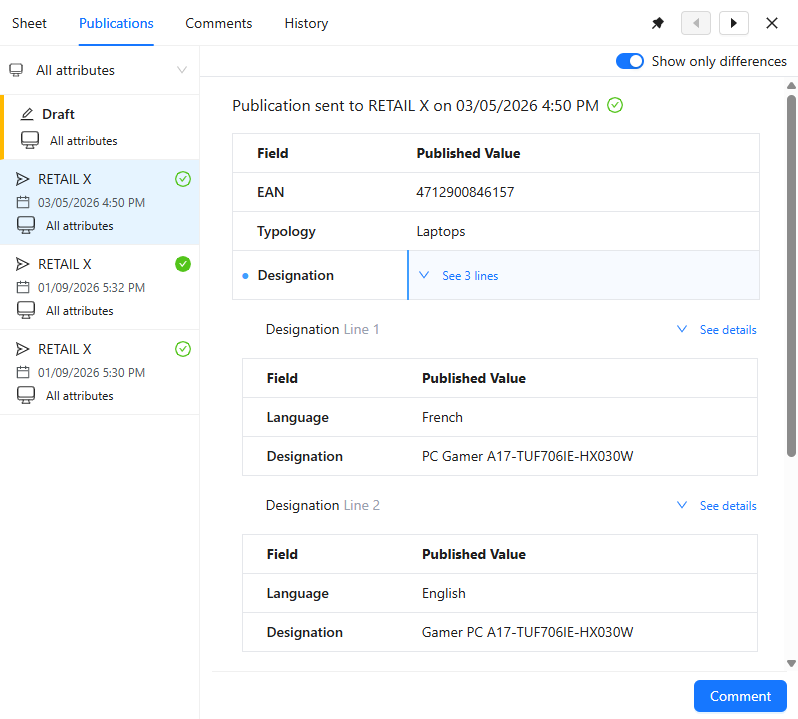
You can now see the composite fields you will publish to your partner in your draft publication. This enables a full view of all data that will be published simplifying controls.
You can now see your the composite fields published to your partner in your publication history. This enables a full view of all published data simplifying controls.
| Draft Publication | Past publication |
|---|---|
 |  |
Resolved issues
🧰 Data Factory
Fix invalid number handling
Now, throughout the entire Product-Live platform, number validity is correctly enforced. Any number exceeding a total of 15 digits (including digits before and after the decimal point) is automatically rejected.
📥 Publication/Collect
Fix an issue on suggestions
You can now see your item current specific fields in the suggestion pane enabling you to easily compare the suggested values from your partner with you current product values so that you can accurately agree to update your product or not.
💻 User Experience
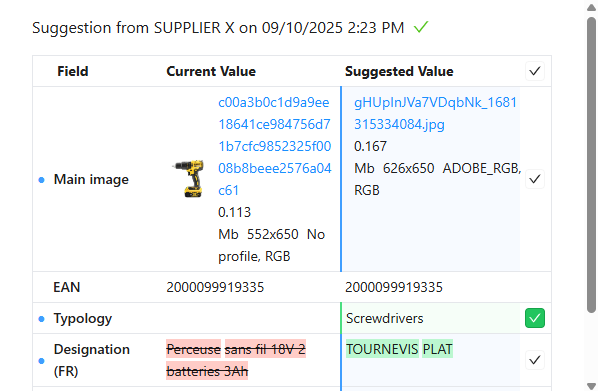
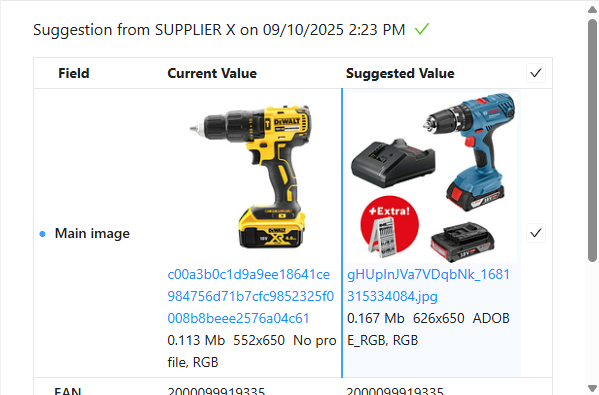
Fix an issue preventing to see images in suggestions
You can now correctly see your and the suggested images in your suggestions enabling to control them before updating your product.
| Before | Now |
|---|---|
 |  |
11/03/2026
Planned interruption of Product-Live Data Factory between 18:30 and 20:20 CET (Paris time zone)
As part of routine maintenance, we will be performing updates on our infrastructure.
During this window, job processing will be temporarily paused. All jobs are expected to resume automatically once maintenance is complete.
For updates and more information, please visit our status page
10/03/2026
Planned interruption of Product-Live Data Factory between 12:00 and 12:30 CET (Paris time zone)
As part of routine maintenance, we will be performing updates on our CDN and tooling.
During this window, job processing will be temporarily paused. All jobs are expected to resume automatically once maintenance is complete.
For updates and more information, please visit our status page
05/03/2026
App: 5.77.0
Settings: 5.77.0
Improvements
🧰 Data Factory
Define Composite collect strategies
Simplify Composite field collect for referencing and enrichment phases enabling collect automation and guiding users in applying suggestion on the correct lines.
xml
<Field key="TITLE" type="COMPOSITE" level="PRODUCT" multi-valued="true">
    <Title>Title</Title>
    <CollectStrategies>
        <CollectStrategy type="BY_FIELDS" priority="1">
            <Field key="LOCAL_LANGUAGE" />
        </CollectStrategy>
        <CollectStrategy type="BY_ID" priority="2" />
        <CollectStrategy type="BY_POSITION" priority="3" />
    </CollectStrategies>
    <Field key="LOCAL_TITLE" type="SINGLE-LINE-TEXT">
        <Title>Local title</Title>
    </Field>
    <Field key="LOCAL_LANGUAGE" type="SINGLE-SELECT">
        <Title>Local language</Title>
        <Options>
            <Option key="FRA">
                <Title>French</Title>
            </Option>
            <Option key="ENG">
                <Title>English</Title>
            </Option>
            <Option key="DEU">
                <Title>German</Title>
            </Option>
            <Option key="SPA">
                <Title>Spanish</Title>
            </Option>
        </Options>
    </Field>
</Field>Resolved issues
🗨️ Comments
Fix an issue preventing to comment items
You can now start new comment threads with your partner, regardless of existing threads, to improve and speed up your communication.
February
26/02/2026
App: 5.76.0
Settings: 5.76.0
Resolved issues
🎨 Conditional Formatting
Fix a Conditional Formatting refresh issue
When fields are subjects to some Conditional Formatting rule conditions (condition based on IN operator) updating the condition correctly refreshes the Conditional Formatting status.
24/02/2026
App: 5.76.0
Settings: 5.76.0
Improvements
💻 User Experience
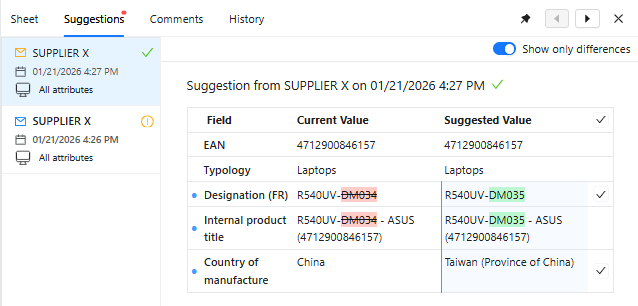
Improve Suggestions usability
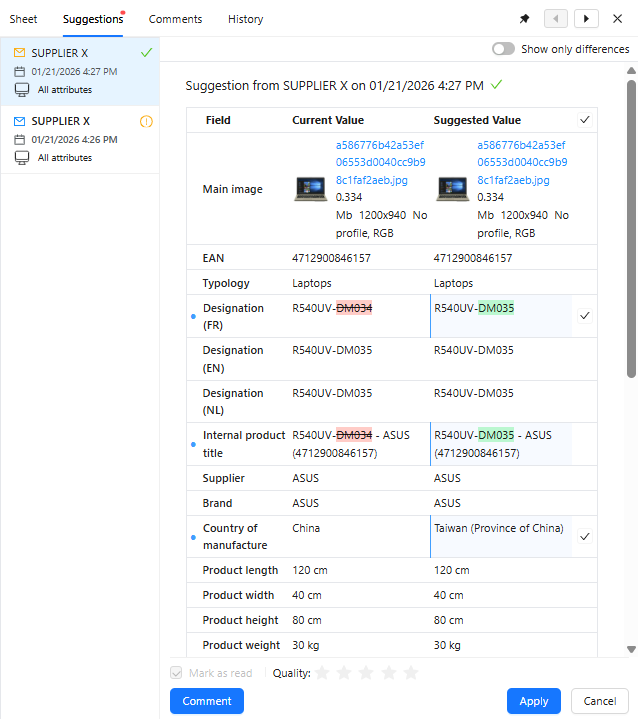
When you reference and enrich your products from your partner suggestions, you can now better see what data has been shared helping you better review them and complete your product for its commercialization.
You can also choose to view either all suggested values or only the suggested changes within your suggestions. This also includes text changes, allowing you to easily assess the completeness of the data published by your partner.
 |  |
|---|
Improve Publications usability
You can now see all your publications as well as publications published from a specific screen enabling you to easily check which data have been published and when to your partner.
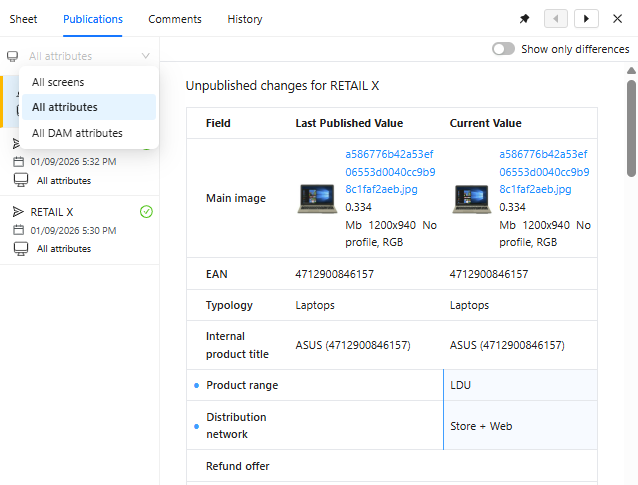
You can now easily see what values will be published to your partner in your next publication. It highlights you what updated values will be published enabling you to easily check your data quality before publishing it.
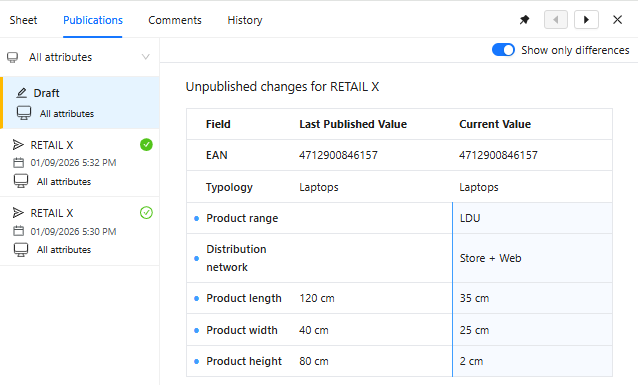
Improve Publications and Suggestions display
When consulting the draft publications or the collected suggestions, you can now see in live the differences with the current item values even when you edit them.
New page navigation
We introduce a new grid page navigation feature designed to enhance your browsing experience. It allows you to navigate more efficiently and view your products more clearly, while also providing additional space to better visualize your data.
| Current Grid Page Navigation | New Grid Page Navigation |
|---|---|
 |  |
This updated navigation is part of our ongoing efforts to improve user experience. Currently, a select group of users will benefit from this feature as we gather feedback and continue refining our solution. Your insights will help us make future enhancements for all users.
🌐 API
homogenization of Items definitions
Improve both Items API and item Twig format for more easily automating processes through APIs and automating fields with the Rules Engine templates.
🧰 Data Factory
Add report level
You can now define the log level you need to be generated by each Data Factory task during its execution. That enables you to easily debug your jobs during development process, and limit the amount of messages raised in productions to only see critical failures.
json
{
  "name": "table-import-schema",
  "taskReferenceName": "import_table_schema",
  "description": "The business description of the task",
  "type": "SUB_WORKFLOW",
  "optional": false,
  "inputParameters": {
    "request": "${previous_taskReferenceName.output.file}",
    "mode": "EXHAUSTIVE",
    "logLevel" : "ERROR"
  }
}New Data Factory tasks
New Data Factory tasks are now available to help you build and execute more advanced workflows to automate your processes.
Resolved issues
🎨 Conditional Formatting
Fix an issue in Composite fields Conditional Formatting
It is now possible to check Composite fields inner fields conformity against other fields on the same line improving products data quality.
🧰 Data Factory
Fix a refresh item issue
When updating the table schema on tables with numerous items and conditional formatting, the refresh of item conditional formatting statuses now completes correctly.
Fix an issue preventing item refresh
When refreshing items automated fields and conditional formatting status on multi-levels tables, the Data Factory task now completes successfully.
Fix a Data Factory job execution details
You can now again see your Data Factory tasks progress enabling you to see how much has been done and how much remains.
12/02/2026
App: 5.74.0
Settings: 5.74.0
Planned interruption of Product-Live Data Factory between 12:00 and 14:00 CET (Paris time zone)
As part of routine maintenance, we will be performing updates on our tooling.
During this window, job processing will be temporarily paused. All jobs are expected to resume automatically once maintenance is complete.
For updates and more information, please visit our status page
Improvements
💻 User Experience
Improve Publications usability
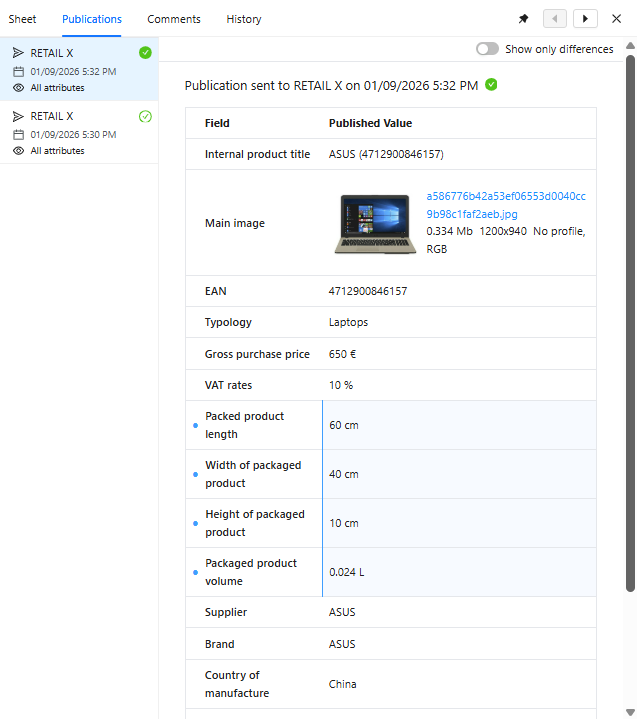
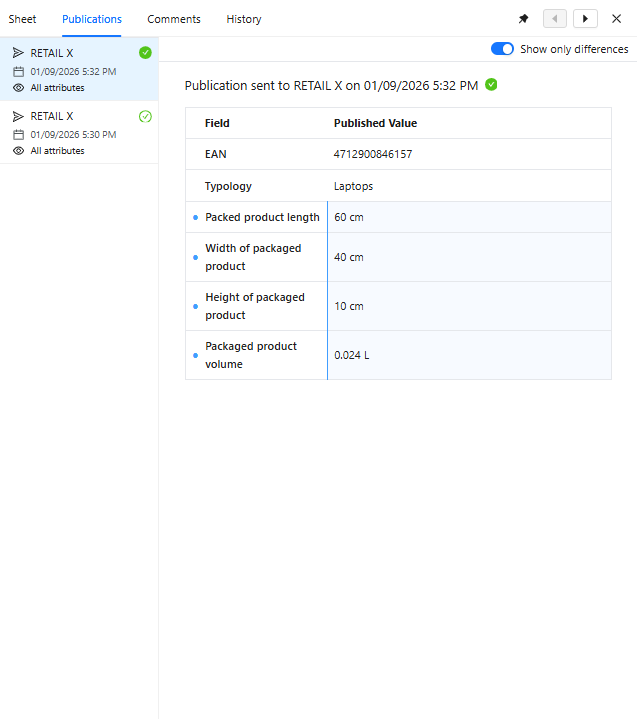
We have enhanced the publication side pane, which displays the product data you've published to your partner. Now, it's easier to see exactly what information has been published, and when. This improvement helps you quickly assess what was sent and when, providing reassurance about the progress and completeness of your product data for both you and your partner.
When viewing the content you've published to your partner, you can now easily see what has been published directly from the current screen. This enhancement allows you to access only the relevant information, simplifying the verification process.
In addition, you can now choose to view either all published values or only the published changes within your publications. This allows you to assess the completeness of your publications and ensures you have a clear understanding of what has been shared with your partner.
 |  |
|---|
📥 Publication/Collect
Improve composite lines handling
You can now define if a field within your composite field must be unique or not thanks to the Data Factory task table-import-schema. That enables you to make sure that each record of a complex field is unique avoiding duplicate or incoherent informations.
xml
<Field key="TITLE_2" type="COMPOSITE" level="PRODUCT" multi-valued="true">
    <Title>Title</Title>
    <Field key="LANGUAGE" type="SINGLE-SELECT" unique="true">
        <Title>Language</Title>
        <Options>
            <Option key="FRA">
                <Title>French</Title>
            </Option>
            <Option key="ENG">
                <Title>English</Title>
            </Option>
            <Option key="DEU">
                <Title>German</Title>
            </Option>
            <Option key="SPA">
                <Title>Spanish</Title>
            </Option>
        </Options>
    </Field>
    <Field key="LOCAL_TITLE" type="SINGLE-LINE-TEXT">
        <Title>Local Title</Title>
    </Field>
</Field>🗃️ Traceability
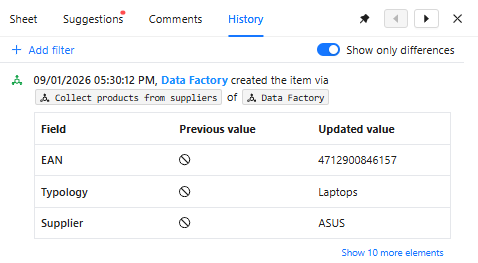
Improve item history details
When an item has been modified by a Data Factory job, that job name is now visible in the item history helping you better understand which workflow updated the values.
Resolved issues
💻 User Experience
Fix an issue preventing to edit composite fields value on shared tables
On shared tables you can now again see the composite field values and edit them, enabling you to complete your product.
📥 Publication/Collect
Fix a publication screen issue
When a classification has been published, it is now correctly displayed as modified or identical to the previous publication enabling you to better understand what updates you published to your partner.
04/02/2026
App: 5.73.0
Settings: 5.73.0
Planned interruption of Product-Live Data Factory between 12:00 and 14:00 CET (Paris time zone)
As part of routine maintenance, we will be performing updates on our tooling.
During this window, job processing will be temporarily paused. All jobs are expected to resume automatically once maintenance is complete.
For updates and more information, please visit our status page
Resolved issues
🌉 Mapping
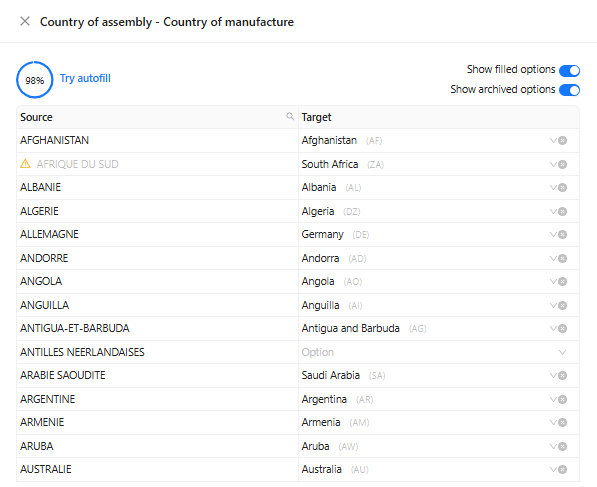
Fix a issue when mapping options and categories
You can now effectively show and hide archived values when mapping options and categories between your and your partner tables enabling you to focus on only relevant values.
🌐 API
Fix an issue on the Suggestions api
When products with received suggestions are deleted, you can now again retrieve all suggestions through the Suggestions api.
🎨 Conditional Formatting
Fix an issue preventing to check conformity between two composite child fields
It is now possible to check conformity between two fields within composite fields enabling you to guide user when completing your products ensuring value are accurate and comply with required validity rules.
💻 User Experience
Fix medias editions in composite fields
Within composite fields, you can now use all keyboard shortcuts as on the grid to edit and apply images and files. Use Ctrl + Enter to valide the image and file set on a field to save it.
Fix an issue preventing to edit html fields in composite fields
You can now edit your product's composite fields from the detail view as you do from the grid, enabling you to keep completing your products as you are used to.
Fix an issue preventing to edit composite fields image fields
Within composite fields, the image editor now correctly display where expected enabling you to easily update your medias on your product.
Fix a conditionnal formatting issue
When editing your products properties, but cancelling your edition, the field conditionnal formatting is now accurately updated keeping you informed of what remains to update.
Fix a composite fields edition issue
When you open a composite fields from the detail view and choose de delete the value of the first field, it is now that first field which is deleted.
January
27/01/2026
App: 5.72.0
Settings: 5.72.0
Planned interruption of Product-Live between 12:00 and 12:15 CET (Paris time zone)
As part of routine maintenance, we will be performing updates on our tooling.
During this window, job processing will be temporarily paused and entiere plateform will be unvailable . All jobs are expected to resume automatically once maintenance is complete.
For updates and more information, please visit our status page
Improvements
🗃️ Traceability
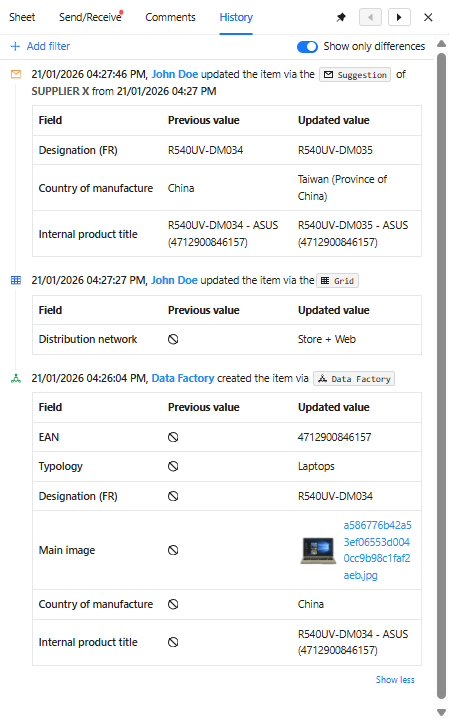
Improved Item history
In the Item history, you can now more easily understand what happened and when to your products by comparing each field's current value with its previous one.
Resolved issues
🧰 Data Factory
Fix unhandled item import error
When a table contains compound identifiers, importing an item that could violate the uniqueness constraint of these identifiers is handled effectively. The Data Factory's table-import-items task process completes successfully and raises an error if a duplicate compound identifier is detected.
🗃️ Traceability
Fix Composite field edition from detail view
You can now edit your product's composite field directly from the detail view, just as you do from the grid. This enhancement allows you to continue building and refining your products seamlessly, using your familiar workflow.
Fix an Item history issue
When a Composite field is edited from the detail view, the origin of the edit is accurately recorded as originating from the detail view. This helps you better understand how the change was made.
Fix an Item history filtering issue
When searching for item changes within a specified time frame, you can now view relevant modifications with greater accuracy. This enhancement enables you to narrow your focus to a particular period, simplifying the process of identifying and analyzing changes during your chosen timeframe.
Fix an Item history issue
Now, when you begin editing a field but cancel the action, no record of that attempt is stored, since no actual change has been made to the item. This ensures that only genuine modifications are reflected in your item's history, providing a clearer and more accurate record of changes.
19/01/2026
App: 5.71.0
Settings: 5.71.0
Resolved issues
🗃️ Traceability
Fix an Item history issue
You can now again consult your item history when a multiple select field has been edited allowing you to easily figure out what changed, when and how on your products.
14/01/2026
App: 5.71.0
Settings: 5.71.0
Planned interruption of Product-Live Data Factory between 12:00 and 12:15 CET (Paris time zone)
As part of routine maintenance, we will be performing updates on our tooling.
During this window, job processing will be temporarily paused. All jobs are expected to resume automatically once maintenance is complete.
For updates and more information, please visit our status page
Improvements
🔢 Formula
New Twig engine for formulas in Rules Engine
A new Twig engine is now available to execute formulas in the Rules Engine. That new engine is faster enabling you to get your products computed fields refreshed faster so that you know quicker what are the exact values and what remains to do.
🗃️ Traceability
Improve Items history with Composite field changes
Composite fields changes are now saved and accessible in the item history. This enables you to track what changed, when and how on your product's complexe data.
Resolved issues
🗃️ Traceability
Fix an issue in filtering item history
You can now again filter item history based on fields enabling you to easily see only the changes on the field to inspect.
Fix an issue preventing to consult older Item history
You can now go through your items history as expected without a 7 day constraint enabling you to see older changes and better understand what happened on your items.
💻 User Experience
Fix an edition issue on composite fields
Whatever the field key within a composite field, it is now possible to edit and delete its value from the interface.